

Ingestion Modes
Understand how Streamkap writes records to destinations: insert vs upsert behavior, primary keys, and delete handling.
For real-time data streaming, the Insert method is typically the fastest at loading data and the most cost-effective.
Streamkap Destinations support one or more of the following ingestion modes:
Insert
This method inserts each change as a new record in the destination.
For example, if you have an e-commerce record where the order status has changed, you will have two change events: one showing the status before and one after.
This is useful for tracking data changes and optimizing data loading for some destinations. When choosing this method, consider when to clean up older records, as it affects query performance. Users may prefer not to include additional clauses in their queries to filter out older records, so creating views on top of the change data to retrieve only the latest state (i.e., the after change event) can simplify usage.
Upsert
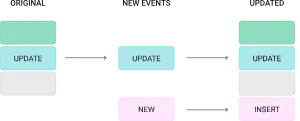
Upserts replace a matching record (based on a primary key) to avoid retaining older versions in the destination – a common approach in batch data processing.
For example, if you have an e-commerce record where the order status has changed, instead of having two records, you retain only the latest state (i.e., the after change event).
This is summarised in the image below:
However, upserting a record isn’t as fast as inserting one. Still, it eliminates the need to modify queries to filter out older records or to create additional views for retrieving the latest state.
Primary Key Modes
Primary key mode controls how the destination connector resolves the primary key columns for each table. The primary key determines how records are matched during upsert operations, deduplication, and delete handling.
This setting is available on JDBC destinations: PostgreSQL, MySQL, Oracle, SQL Server, CockroachDB, Db2, and Neon.
There are three primary key modes available:
record_key (default)
Uses the message key – typically the source table’s primary key – as the primary key in the destination table.
This is the recommended mode for most Change Data Capture (CDC) use cases because the source primary key naturally identifies each record. When a record is updated or deleted in the source, the destination can match it by the same key.
When to use:
- Standard CDC replication where the source table has a primary key
- You want the destination table’s primary key to match the source table’s primary key
- You need upsert or delete support
record_value
Derives the primary key from one or more fields within the message value (the record payload) rather than the message key.
This is useful when the message key does not contain the fields you want to use as the destination primary key, or when you need a composite key based on payload fields.
When to use:
- The message key does not match your desired destination primary key
- You need a composite primary key derived from specific payload fields
- Custom key logic is required for the destination table
none
No primary key is enforced on the destination table. Every record is inserted as a new row regardless of whether a matching record already exists.
When to use:
- Append-only or log-style tables where you want to retain every change event
- Audit trails or event history tables
- Scenarios where deduplication is not needed
Custom Primary Key
When primary key mode is set to record_key or record_value, you can optionally specify a Custom primary key. This accepts either:
- A single column name (e.g.,
order_id) - A comma-separated list of column names for a composite key (e.g.,
order_id,line_item_id)
If left empty with record_key mode, the connector uses the full message key structure. If left empty with record_value mode, the connector uses all fields from the record value as the key, which is rarely the desired behavior – so specifying fields explicitly is strongly recommended.
Applicable Destinations
Primary key mode is available on the following JDBC destinations:
| Destination | Supports PK Mode | Default Mode |
|---|---|---|
| PostgreSQL | Yes | record_key |
| MySQL | Yes | record_key |
| Oracle | Yes | record_key |
| SQL Server | Yes | record_key |
| CockroachDB | Yes | record_key |
| Db2 | Yes | record_key |
| Neon | Yes | record_key |
Delete Handling
When a row is deleted in a source database, Streamkap’s CDC pipeline captures that event and propagates it to the destination. How that delete is applied – whether the row is physically removed, marked as deleted, or simply appended as a new event – depends on the ingestion mode and the delete configuration of your destination connector.
How Deletes Flow
A delete event follows these steps from source to destination:
- Source database: A row is deleted (e.g.,
DELETE FROM orders WHERE id = 42). The database records this operation in its transaction log (WAL, binlog, redo log, etc.). - CDC capture: Streamkap reads the delete event from the transaction log and produces a message to the internal Kafka topic. This message includes the primary key of the deleted row and a delete marker (sometimes called a tombstone).
- Kafka message: The delete event is stored as a Kafka message with the row’s primary key and metadata indicating a delete operation.
- Destination connector: The destination connector consumes the message and applies the delete according to the configured ingestion mode and delete mode settings.
Delete Behavior Matrix
The outcome of a delete event at the destination depends on two factors: the ingestion mode (insert or upsert) and whether delete mode is enabled.
| Ingestion Mode | Delete Enabled | What Happens at the Destination |
|---|---|---|
| Upsert | Yes | The row is physically removed from the destination table. |
| Upsert | No | Depends on destination type (see note below). |
| Insert / Append | N/A | A new row is appended with the __DELETED column set to 'true'. The original row is not modified or removed. |
Configuring Delete Mode
The setting name and behavior vary depending on your destination connector type.
JDBC Destinations
Applies to: PostgreSQL, MySQL, Oracle, SQL Server, CockroachDB, Db2, Neon
| Setting | Delete mode |
|---|---|
| Type | Boolean |
| Default | Off (deletes are not processed) |
| Where to configure | Destination connector settings |
| Behavior when enabled | DELETE or tombstone events cause the corresponding row to be removed from the destination. |
| Behavior when disabled | Delete events are ignored. The row remains at the destination unchanged. |
Snowflake and ClickHouse
| Setting | Delete Mode |
|---|---|
| Type | Boolean |
| Default | On (deletes are processed) |
| Applies to | Upsert mode only |
| Where to configure | Destination connector settings |
| Behavior when enabled | DELETE or tombstone events cause the corresponding row to be removed from the destination table. |
| Behavior when disabled | The row remains at the destination. The __DELETED column is set to 'true'. |
Other Destinations
For other destinations (BigQuery, Databricks, S3, MotherDuck), check your specific destination documentation for delete mode availability.
The __DELETED Column
Streamkap adds a __DELETED metadata column to destination tables. This column indicates whether the corresponding row has been deleted in the source database.
| Value | Meaning |
|---|---|
'false' |
The row exists (has not been deleted) in the source database. |
'true' |
The row has been deleted in the source database. |
When __DELETED appears:
- Insert/append mode: Every row includes the
__DELETEDcolumn. Delete events are appended as new rows with__DELETED = 'true'. - Upsert mode with delete disabled (Snowflake/ClickHouse): The existing row is updated with
__DELETED = 'true'instead of being removed. - Upsert mode with delete disabled (JDBC): Delete events are ignored. The row remains unchanged.
- Upsert mode with delete enabled: Deleted rows are physically removed, so you will not typically see
__DELETED = 'true'rows in the destination (they are removed upon processing).
Using __DELETED for soft deletes:
If you are using insert/append mode or upsert mode with delete disabled, you can filter out deleted rows in your queries:
-- Get only active (non-deleted) rows
SELECT *
FROM my_table
WHERE __DELETED = 'false';
This pattern is commonly used when building final-state tables or materialized views from append-only data. See Creating Final State Tables for detailed examples with Snowflake Dynamic Tables, Tasks, and dbt models.
For a full list of metadata columns Streamkap adds, see Metadata.
Truncate Events
How Modes Interact
The primary key mode, ingestion mode, and delete mode work together to determine how records are delivered to the destination. The table below shows how these settings interact.
When Delete mode is enabled on JDBC destinations, the primary key mode is automatically set to record_key. This is because delete operations require a stable, well-defined primary key to identify which row to remove.
| Primary Key Mode | Ingestion Mode | Delete Enabled | Behavior |
|---|---|---|---|
record_key |
Upsert | Yes | Rows are upserted by source PK. Deletes physically remove the matching row. |
record_key |
Upsert | No | Rows are upserted by source PK. Delete behavior depends on destination type: JDBC ignores delete events; Snowflake/ClickHouse sets __DELETED = 'true'. |
record_key |
Insert | Yes / No | Each change is appended as a new row. Delete events are appended with __DELETED = 'true'. |
record_value |
Upsert | N/A | Rows are upserted by the specified payload fields. Delete events may not propagate correctly because tombstone records have a null value, so the connector cannot extract a primary key. |
record_value |
Insert | N/A | Each change is appended as a new row. Delete events are appended with __DELETED = 'true'. |
none |
Insert | N/A | All records are appended (insert-only). No deduplication or delete support. Delete events are appended with __DELETED = 'true'. |
Decision matrix for choosing primary key mode:
| Use Case | Recommended Mode | Delete Support | Custom PK |
|---|---|---|---|
| Standard CDC replication | record_key |
Yes | Optional |
| Destination PK differs from source PK | record_value |
No (requires record_key) |
Required |
| Composite key from payload fields | record_value |
No (requires record_key) |
Required |
| Append-only / event log table | none |
No | N/A |
| Delete handling required | record_key (auto-set) |
Yes | Optional |
Delivery Guarantees
Streamkap provides at-least-once delivery:
- Every change is delivered at least once
- In failure scenarios, some events may be delivered more than once
- Upsert mode handles duplicates automatically via primary key deduplication
- Insert/append mode may result in duplicate rows – use metadata columns (
_STREAMKAP_TS_MSand_STREAMKAP_OFFSET) to deduplicate at query time
See Creating Final State Tables for deduplication patterns using Snowflake Dynamic Tables, Tasks, and dbt models.
Troubleshooting
Duplicate records at destination
If you see duplicate rows in your destination table for the same logical record:
- Check primary key mode. If the mode is
none, duplicates are expected because every event is inserted as a new row. Switch torecord_keyorrecord_valueif you need upsert (deduplication) behavior. - Check the Custom primary key setting. If you are using
record_valuemode without specifying the primary key fields, the connector may use all payload fields as the key, which can produce unexpected matching behavior. Specify the correct field(s) explicitly. - Check for schema changes. If the source table’s primary key changed, existing destination rows keyed on the old primary key will not match new records keyed on the updated primary key. A snapshot may be needed.
- Check destination table DDL. Ensure the destination table has a primary key or unique constraint defined on the expected columns. Some destinations require this for upsert behavior to work.
Upsert not working
If records are being inserted as new rows instead of updating existing rows:
- Verify ingestion mode. Upsert behavior requires the ingestion mode to be set to upsert on the destination connector. If the mode is set to insert, all records are appended regardless of primary key mode.
- Verify primary key mode. Upsert requires either
record_keyorrecord_valuemode. Thenonemode does not support upserts. - Verify the destination supports upserts. Not all destination types support upsert operations. Check your destination’s documentation for details.
- Check Custom primary key alignment. The fields specified in the Custom primary key setting must match columns that exist in the destination table and are defined as the primary key or unique key.
Deletes not propagating to the destination
If delete events from the source are not removing rows at the destination:
- Check delete mode. Delete handling requires Delete mode to be enabled on the destination connector. When delete mode is enabled on JDBC destinations, the primary key mode is automatically set to
record_key. - Check primary key mode. Only
record_keymode supports delete propagation. If you are usingrecord_valueornone, delete events cannot be matched to destination rows. - Check source configuration. For MySQL/MariaDB sources, ensure
binlog_row_imageis set toFULLso that delete events contain the full row data needed for matching. - Check ingestion mode. Delete handling (physical row removal) requires upsert ingestion mode. Insert-only mode does not process deletes – it appends them as new rows with
__DELETED = 'true'.
I deleted a row at the source, but it still exists at the destination
There are several common reasons why a deleted row may still appear at the destination:
-
Delete mode is disabled. Check your destination connector settings and verify that Delete mode is enabled.
-
You are using insert/append mode. In insert mode, delete events do not remove existing rows. Instead, a new row is appended with
__DELETED = 'true'. The original row remains. This is expected behavior – filter onWHERE __DELETED = 'false'to see only active rows. -
The source table has no primary key. Delete events require a primary key to identify which row to remove. If your source table lacks a primary key, the delete event may not be applied correctly at the destination.
-
There is pipeline lag. The delete event may not have been processed yet. Check the pipeline status and consumer lag in the Streamkap UI.
How do I keep deleted rows for auditing instead of removing them?
Use one of these approaches:
- Insert/append mode: All changes, including deletes, are appended as new rows. Query with
WHERE __DELETED = 'false'to see only active records. - Upsert mode with delete disabled: The row stays at the destination but its
__DELETEDcolumn is updated to'true'. You retain the latest state of every row, including those that have been deleted.
What is a tombstone message?
A tombstone is a Kafka message with a valid key but a null value. In CDC, tombstones represent delete events – they indicate that the row identified by the key has been removed from the source database. Streamkap processes tombstones according to your destination’s delete mode configuration.
MySQL cascade deletes are not captured by CDC
If you rely on cascading deletes in MySQL, verify that child table deletions are reflected at the destination by checking the child tables directly. Consider using application-level deletes instead of database-level cascades if full CDC coverage is required.
Do deletes work with tables that have composite primary keys?
Yes. Delete events include the full primary key (all key columns) from the source table. The destination connector uses all key columns to identify and remove the correct row.
What happens if the same row is deleted and then re-inserted at the source?
Streamkap processes events in order. If a row is deleted and then a new row with the same primary key is inserted:
- Upsert mode with delete enabled: The row is first removed, then re-inserted with the new values.
- Insert/append mode: Both events are appended – a delete event (
__DELETED = 'true') followed by an insert event (__DELETED = 'false').
Related Documentation
- Metadata – Metadata columns added by Streamkap for deduplication and tracking
- Creating Final State Tables – How to build deduplicated views from append-only data
- Snapshots – How initial and incremental snapshots work