

Stripe
Stream Stripe payments, billing, Radar, Connect and Issuing objects into Kafka topics with a read-only restricted API key from your own Stripe account.
The Stripe source reads objects from your Stripe account, such as customers, charges, invoices and subscriptions, and writes each resource you select to its own topic, source_<id>.stripe.<resource>.
To receive Stripe’s webhook events as they happen instead of polling, see Stripe Webhook.
Prerequisites
- A Stripe Dashboard user who can create restricted API keys.
- A restricted API key (
rk_live_…orrk_test_…) with Read on Events, on Accounts and on each resource you select. A secret key (sk_…) is refused: it has full write access, and Stripe requires third-party services to use restricted keys. - For the Connect resources, a Connect platform account; for the
issuing_*resources, Issuing; forquotes, Invoicing Plus or Billing. See Connect and Issuing.
Test Mode and Live Mode
A key reads only the mode its prefix names: rk_test_… reads a sandbox or test mode, rk_live_… your live data. To sync both, create two sources, one per key. Live and test mode of one account count as different accounts, so both sources are allowed.
Stripe Setup
1. Create a Restricted Key
The Create a key for … links under Restricted API key on the source’s Auth step open Stripe’s create-key form with Read already set on Events, Accounts and the resources of one preset: Create a key for Standard e-commerce, Create a key for Subscriptions & billing, Create a key for Marketplace / Connect, or Create a key for every resource. With the every-resource link, set Early fraud warnings to Read yourself if you select early_fraud_warnings.
To build the key by hand instead:
- In the Stripe Dashboard, switch to the mode you want to sync and go to Developers → API keys.
- Click Create restricted key and enter a Key name, for example
streamkap. - Set Events, Accounts and the permission of each resource you plan to sync to Read (see Supported Resources). Leave everything else at None.
- Click Create key and complete Stripe’s verification.
2. Copy the Key
Click the key value to copy it.
Streamkap Setup
1. Create the Source
- Navigate to Add Connectors.
- Choose Stripe.
2. Connection Settings (Auth Tab)
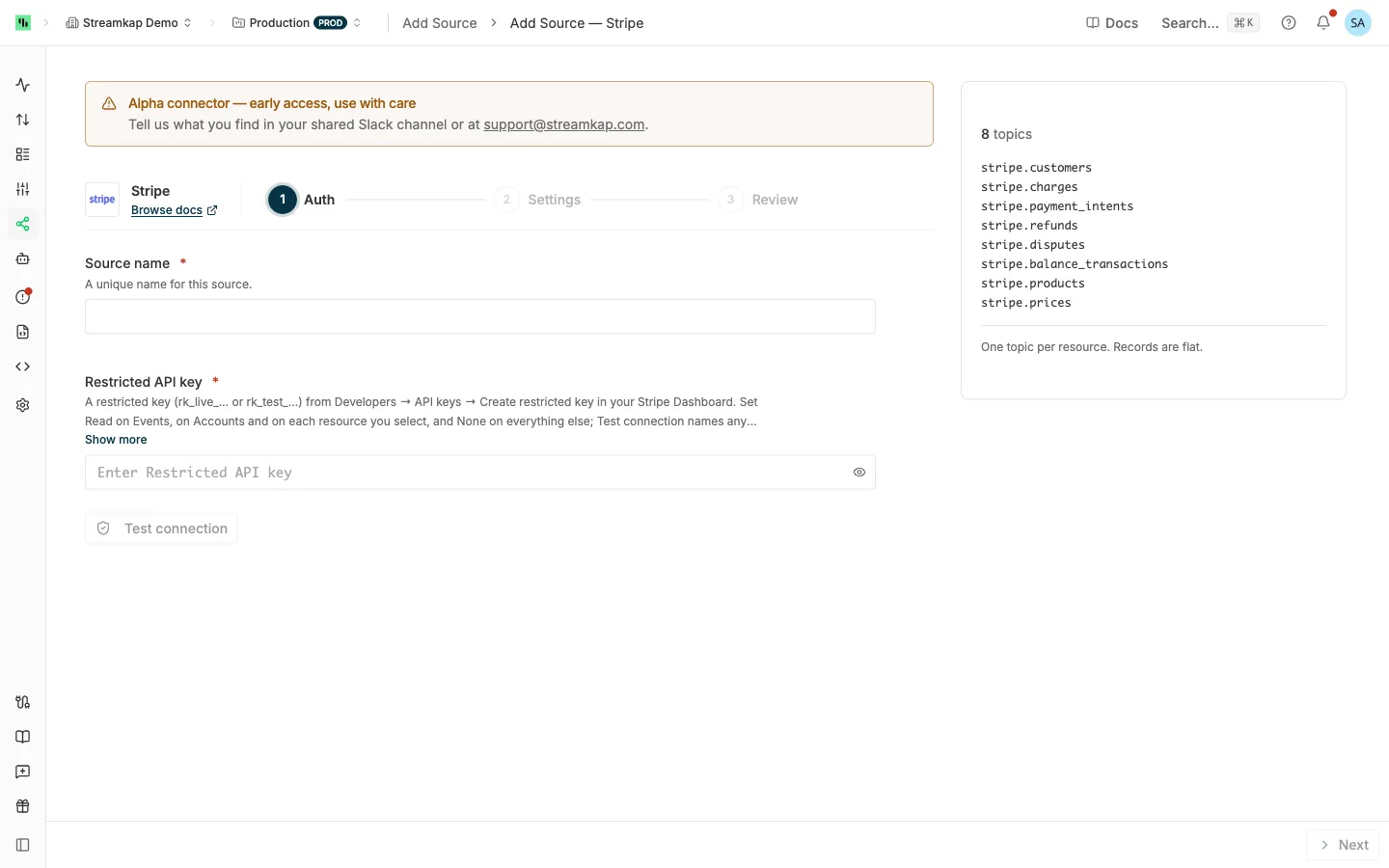
- Source name: A unique name for this source, for example
stripe-live. - Restricted API key: The
rk_live_…orrk_test_…key. Surrounding spaces are trimmed. A publishable key (pk_…) or webhook signing secret (whsec_…) is refused.
Test connection reads your account and its events, and on success shows the account and mode the key belongs to, such as acct_1A2b3C (live). If the key cannot read Accounts or Events, the message names the permission to set to Read. See Test connection and Test access. Click Next.
3. Settings Tab
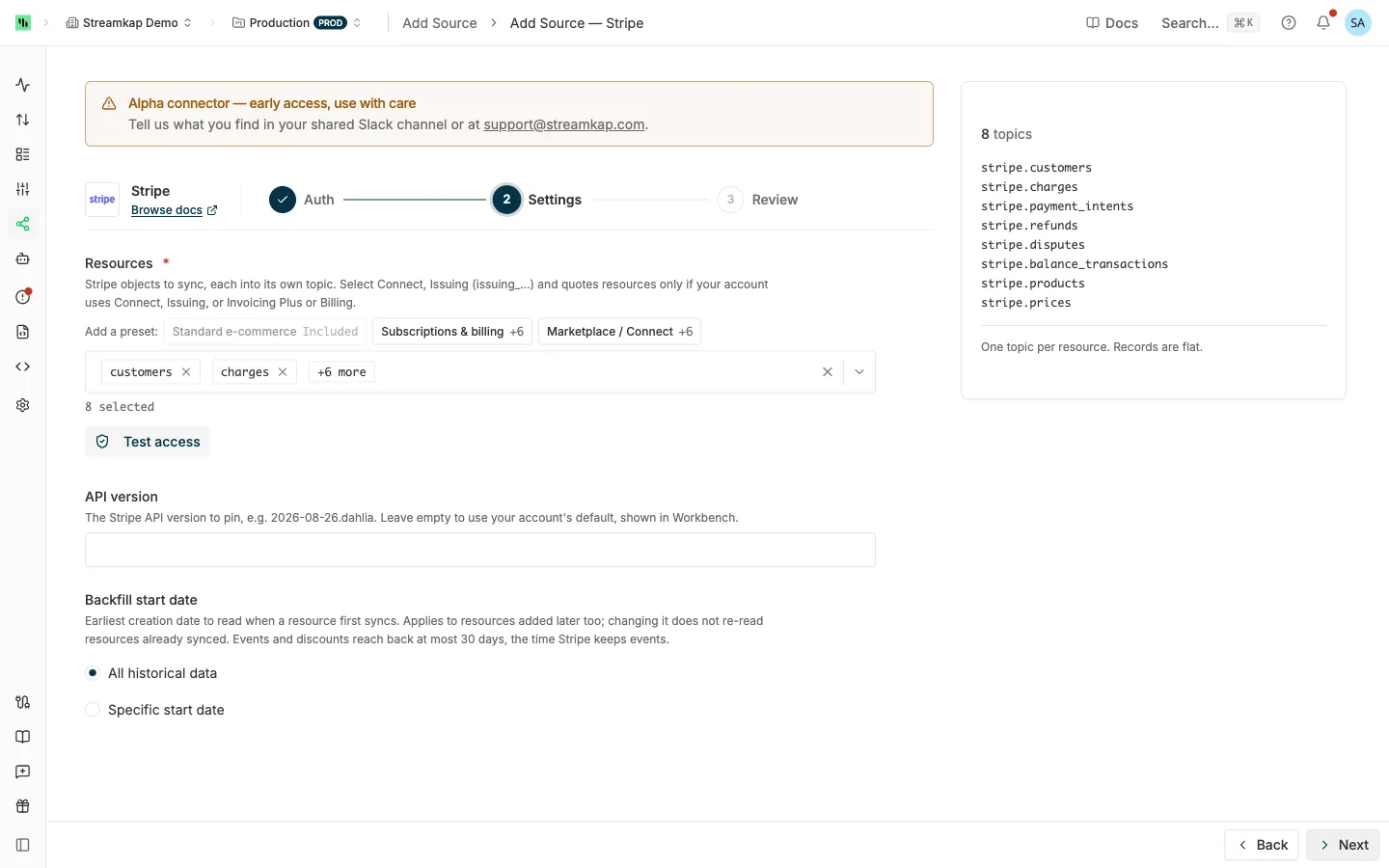
-
Resources: The Stripe objects to sync. The form starts with Standard e-commerce. Add a preset adds one of these to the selection:
Preset Adds Read permissions, besides Events and Accounts Standard e-commerce customers,charges,payment_intents,refunds,disputes,balance_transactions,products,pricesCustomers, Charges and Refunds, Payment Intents, Payment Disputes, Balance, Products, Prices Subscriptions & billing Standard e-commerce, plus invoices,invoice_line_items,subscriptions,subscription_items,plans,couponsStandard e-commerce’s, plus Invoices, Subscriptions, Coupons Marketplace / Connect Standard e-commerce, plus accounts,transfers,transfer_reversals,application_fees,application_fee_refunds,payoutsStandard e-commerce’s, plus Transfers, Application Fees, Payouts Marketplace / Connect leaves out
personsandexternal_accounts, which most platform keys cannot read (see Connect and Issuing). -
API version (optional): Leave blank to use your account’s default, shown in Workbench. Set it to pin a version, for example
2026-08-26.dahlia. See API Version. -
Backfill start date: See Backfill start date. For Stripe it bounds an object’s creation time.
eventsanddiscountsreach back at most 30 days, re-listed resources ignore it, and every payment link is read, since a payment link has no creation time.
4. Review and Create
Click Create. Streamkap checks the key and every selected resource again before it creates the source. One source is allowed per Stripe account and mode; see One source per vendor account. Then send the topics to a destination: see Send topics to a destination.
Editing the Source
- Rotating the key: rotate or create the key in Stripe, click Replace on the Auth tab, paste the new key and save. The source continues from where it stopped.
- Adding resources: grant their permissions on the key first, because the save checks every selected resource. See Editing an API source.
Supported Resources
There are 56 resources. Each record is the whole Stripe object; nested values such as metadata, addresses and embedded lists arrive as JSON text. Stripe has no custom objects: your own fields live in metadata.
How each kind is read:
- Evented: backfilled from the list endpoint, then kept current from Stripe’s events (
/v1/events) every poll. - Child: a list Stripe serves per parent, re-read whole whenever the parent changes. See Child Lists.
- Child, then evented: backfilled per customer, then kept current from their own events.
- Re-listed: no events exist, so the whole list is read every six hours and only changed rows are written.
- Append-only:
balance_transactions, read from its list each poll. - Event log:
events, one row per Stripe event, at most 30 days back. - Events only:
discounts, read fromcustomer.discount.*events, at most 30 days back.
| Resource | Kind | Read permission | Deleted downstream |
|---|---|---|---|
customers |
Evented | Customers | Yes |
charges |
Evented | Charges and Refunds | |
payment_intents |
Evented, weekly re-read | Payment Intents | |
invoices |
Evented | Invoices | Drafts only |
subscriptions |
Evented | Subscriptions | |
products |
Evented | Products | Yes |
prices |
Evented | Prices | Yes |
coupons |
Evented | Coupons | Yes |
refunds |
Evented | Charges and Refunds | |
disputes |
Evented | Payment Disputes | |
invoiceitems |
Evented, weekly re-read | Invoices | Yes |
plans |
Evented | Prices | Yes |
payouts |
Evented | Payouts | |
promotion_codes |
Evented | Promotion Codes | |
setup_intents |
Evented, weekly re-read | Setup Intents | |
subscription_schedules |
Evented | Subscriptions | |
checkout_sessions |
Evented | Checkout Sessions | |
reviews |
Evented | Reviews | |
topups |
Evented, weekly re-read | Top-Ups | |
credit_notes |
Evented | Credit Notes | |
early_fraud_warnings |
Evented | Early fraud warnings | |
tax_rates |
Evented | Tax Rates | |
quotes |
Evented, weekly re-read | Quotes | |
payment_links |
Evented | Payment Links | |
billing_meters |
Evented | Billing Meters | |
balance_transactions |
Append-only | Balance | |
events |
Event log | Events | |
discounts |
Events only | Events | Yes |
invoice_line_items |
Child of invoices |
Invoices | |
subscription_items |
Child of subscriptions |
Subscriptions | |
checkout_session_line_items |
Child of checkout_sessions |
Checkout Sessions | |
credit_note_lines |
Child of credit_notes |
Credit Notes | |
setup_attempts |
Child of setup_intents |
Setup Intents | |
customer_balance_transactions |
Child of customers |
Customers | |
payout_balance_transactions |
Child of payouts |
Payouts and Balance | |
payment_methods |
Child of customers, then evented |
Customers and Payment Methods | |
customer_cards |
Child of customers, then evented |
Customers | Yes |
customer_bank_accounts |
Child of customers, then evented |
Customers | Yes |
files |
Re-listed | Files | Yes |
file_links |
Re-listed | Files | Yes |
shipping_rates |
Re-listed | Shipping Rates | Yes |
value_lists |
Re-listed | Radar Value Lists | Yes |
value_list_items |
Re-listed, per value list | Radar Value Lists | Yes |
usage_record_summaries |
Re-listed, per subscription item | Subscriptions and Usage Records | Yes |
accounts |
Re-listed (Connect) | Accounts | Yes |
persons |
Re-listed per connected account (Connect) | Accounts | Yes |
external_accounts |
Re-listed per connected account (Connect) | Accounts | Yes |
transfers |
Evented (Connect) | Transfers | |
transfer_reversals |
Child of transfers (Connect) |
Transfers | |
application_fees |
Evented (Connect) | Application Fees | |
application_fee_refunds |
Child of application_fees (Connect) |
Application Fees | |
issuing_cards |
Evented (Issuing) | Issuing Cards | |
issuing_cardholders |
Evented (Issuing) | Issuing Cardholders | |
issuing_authorizations |
Evented (Issuing) | Issuing Authorizations | |
issuing_transactions |
Evented (Issuing) | Issuing Transactions | |
issuing_disputes |
Evented (Issuing) | Issuing Disputes |
Every record carries streamkap_changed_at, a UTC YYYY-MM-DDTHH:MM:SSZ timestamp: the object’s created during the backfill, then the created of the event that carried it. A child row takes its parent’s; a re-listed row, or one sent by a weekly re-read, takes the time of that read. Stripe’s own created stays an epoch integer in seconds.
Child Lists
A child list is read per parent and takes the parent’s id in its own column. The parent resource does not have to be selected.
| Resource | Parent | Parent id column |
|---|---|---|
invoice_line_items |
invoices |
invoice |
subscription_items |
subscriptions |
subscription |
checkout_session_line_items |
checkout_sessions |
checkout_session |
credit_note_lines |
credit_notes |
credit_note |
setup_attempts |
setup_intents |
setup_intent |
customer_balance_transactions |
customers |
customer |
payout_balance_transactions |
payouts |
payout |
transfer_reversals |
transfers |
transfer |
application_fee_refunds |
application_fees |
fee |
Every change to a parent re-sends all its children. A child removed from its parent, and every child of a deleted parent, stays in the destination. payout_balance_transactions covers automatic payouts only.
Resource Notes
subscriptionsincludes canceled subscriptions. Stripe’scustomer.subscription.deletedmeans the subscription ended, so it arrives as an update.customersandsubscriptions: objects attached to a test clock are not backfilled, because Stripe’s lists leave them out.checkout_sessions: Stripe sends no event when a session is created, so after the backfill a new session arrives when it completes or expires. Metadata edited after a session completes or expires is not synced: Stripe sends no event for it, and sessions are not in the weekly re-read.payment_intents,setup_intents,topups,quotes,invoiceitems,transfer_reversalsandcustomer_balance_transactionscan be edited without an event. Once a week each re-reads its list and sends the rows that changed, so such an edit arrives up to a week late; on an account with more than about 800 such edits in a week, some can take up to four weeks, or until their next edit for objects created more than 30 days earlier. The first weekly re-read sends again only the objects created in the 30 days before the backfill ended; an event-less edit made during the backfill to an older object arrives with that object’s next edit. Edits that have an event arrive on the next poll.customer_balance_transactionsare re-read weekly only for customers with a balance (balanceorinvoice_credit_balanceset), so an edit without an event under a customer whose balance is back to zero is not synced.balance_transactions: Stripe sends no event when a transaction moves frompendingtoavailable. Once a day the pending ones are read again and each settled one is sent with its newstatus, so a settlement arrives up to a day late.tax_rates,quotes,payment_linksandbilling_metersare never deleted: archiving, deactivating, canceling or expiring arrives as an update. A draft quote’s edits arrive when it is finalized or canceled, or with the weekly re-read.application_fee_refunds: an edit to a refund re-sends that fee’s refunds on the next poll.payment_methods: a detached payment method stays a row withcustomernull.file_linksandshipping_rates: an expired link or archived rate stays a row withexpiredtrue oractivefalse.external_accounts: the cards and bank accounts your connected accounts are paid out to;objectsays which.usage_record_summariesreads Stripe’s legacy metered billing, removed at API version2025-03-31.basil. It works only when the source’s API version is2025-02-24.acaciaor older.billing_metersreplaces it.
Connect and Issuing
The Connect resources need a Connect platform account, the Issuing resources need Issuing, and quotes needs Invoicing Plus or Billing (Settings → Plans in the Stripe Dashboard). On an account without the product, Test access names the product, and on a running source only that resource pauses while the others keep syncing.
A source reads the one account its key belongs to. On a platform that includes the connected accounts, their persons and external accounts, and your transfers and application fees, but not the objects inside each connected account.
Behavior & Limits
Backfill
The first poll of each resource reads its list from the Backfill start date, or 2010-01-01 with All historical data, up to one minute before that poll, then switches to events. A large backfill spreads over several polls.
The backfill sends several requests at once and slows down automatically if Stripe throttles. Customer cards and bank accounts, invoice and credit note lines, subscription items, transfer reversals and application fee refunds are taken from their parent’s listing when it holds them all, so they cost no request per parent. payment_methods and customer_balance_transactions still read each customer.
Deletes
customers, products, prices, coupons, invoices (drafts only; a finalized invoice is voided, which is an update), invoiceitems, plans, customer_cards, customer_bank_accounts and discounts read their deletes from the same events read as their changes, so a delete arrives in order on the next poll. On the first sync, each first writes a delete for every deletion Stripe still keeps (30 days). Other objects change state instead of being deleted, and arrive as updates.
A Stripe deletion event names only the object, so the delete record carries id, object, deleted, streamkap_changed_at and __deleted = true. A destination that soft-deletes by updating the row in place nulls the other columns.
A re-listed row gone from a complete read is deleted on that read, up to six hours later. Child rows are never deleted. For how deletes reach your destination, see Deletes.
Duplicates
Set the destination to upsert on id. A record’s Kafka key is the object’s id (the event’s id on events), and an object can arrive more than once: an object created in the minute before the backfill ends comes from both the list and its event, each poll re-reads its last minute, every parent change re-sends its children, and the weekly re-read re-sends objects created that week (the first time it runs, those created in the 30 days before the backfill ended).
Events Retention
Stripe keeps events for 30 days, and every change and delete after the backfill comes from them.
- Before they age out: once a resource’s events go unread for 20 days, because the source is paused or failing, the status warns that delete coverage is at risk; see Connector status. A resource listed under Deletes that is that far behind reads its events to the end on its next poll, without the usual per-poll cap, so a source resumed in time reads its deletes before they leave Stripe.
- After 30 days: the source recovers on its own. An evented resource re-reads its whole list and continues from events, but a row deleted in the gap stays in the destination.
eventsanddiscountscontinue from the 30-day edge without the gap. Child lists,payment_methods,customer_cardsandcustomer_bank_accountsalso continue from the edge and do not re-read rows changed only in the gap; Reset the source to re-read them.
Re-listed resources do not read events and catch up on their next read.
API Version
- Blank: Streamkap reads your account’s default version once when the source starts and sends it on every request, so a later change to your account’s default does not move the source.
- Set: the version you enter is sent on every request.
Stripe renders an event’s object at the version in force when the event was created, so events from before a version change carry the older shape. Column types come from Stripe’s API specification across every version since 2020-08-27, so a column keeps one type whichever version the source uses.
Rate Limits and Read Allocation
The connector stays below Stripe’s rate limit, leaving room for your own traffic, and backs off when Stripe throttles. Stripe has no daily quota.
Stripe allocates each account 500 reads per transaction over a rolling 30 days, with a floor of 10,000 a month. Evented resources are polled every 15 minutes and share one events read per poll, so an idle account with every resource selected costs about 7,100 reads a month. The backfill costs about one read per 100 objects, once; child lists cost about one read per changed parent; re-listed resources cost about one read per 100 rows every six hours, per parent for the nested ones.
Per-Resource Failures
A missing permission or a missing Stripe product pauses only that resource, which is retried on its own and at once when you save the source; the status message names the permission or product. A rejected key stops the whole source until you save a replacement. See Connector status.
Troubleshooting
“This is a Stripe secret key (sk_…)” or “This is not a Stripe restricted key”
Restricted API key holds a secret key, a publishable key or a webhook signing secret. Create a restricted key under Developers → API keys → Create restricted key (see Stripe Setup) and paste the whole rk_live_… or rk_test_… value.
"Stripe rejected the API key: it is mistyped, rolled, expired or deleted"
Copy the whole key again, or create a new one, and paste it on the Auth tab with Replace. The source recovers when you save.
"Stripe accepted the API key, but it cannot read …"
The key lacks Read on Events or Accounts, which every source needs. In the Stripe Dashboard, open the key’s overflow menu (⋯) → Edit key, set the named permission to Read, and save the source.
The API key cannot read a resource
The key lacks the permission the message names. Set it to Read on the key (see Supported Resources) and save the source, or wait for the 15-minute retry. If you do not need the resource, deselect it.
"This Stripe account does not use …" or "is not a Connect platform"
The account lacks the product the resource needs: Connect, Issuing, or Invoicing Plus or Billing for quotes. Turn the product on in the Stripe Dashboard, or deselect the resource.
persons or external_accounts cannot be read for some connected accounts
Stripe refuses these for connected accounts the platform does not control, such as Standard and Express accounts. No key permission changes that. Deselect the resources if none of your connected accounts allows the read. See Connect and Issuing.
usage_record_summaries fails
Stripe removed legacy metered billing at API version 2025-03-31.basil. Deselect the resource, or set API version to 2025-02-24.acacia or older, which applies to every resource.
"is not a Stripe API version" or "Stripe does not know the API version set on this source"
API version holds a malformed version or one Stripe does not serve. Clear it to use your account’s default, or set one from Stripe’s API changelog, such as 2026-08-26.dahlia.
"Stripe keeps events for 30 days, and … was last read before that"
Stripe refused an events read older than its retention. Reset the source to read the resource in full again. Deletes from the gap are not recovered. See Events Retention.
A deleted object's row has nulls in every column
The delete record carries only id, object, deleted and streamkap_changed_at, and a destination that updates the row in place nulls the rest. See Deletes.
An object deleted in Stripe is still in my destination
Only the resources listed under Deletes are deleted downstream; a canceled subscription or detached payment method is an update. Child rows are never deleted. A deletion that happened while the source went more than 30 days without reading is not recovered.
A balance transaction still shows pending
Pending transactions are re-read once a day, and each that has settled is sent with its new status, so a recent settlement arrives on the next daily read.
Related Documentation
- API sources - how API sources poll, test access, handle deletes and deliver to a destination
- Stripe Webhook - receive Stripe’s webhook events instead of polling