

Zendesk
Stream Zendesk Support tickets, users, organizations and your Support configuration into Streamkap by connecting as a Zendesk admin through Streamkap's Zendesk app.
The Zendesk source reads your Zendesk Support account through the Zendesk API and writes each resource you select to its own Kafka topic, source_<id>.zendesk.<resource>.
Prerequisites
- A Zendesk Support or Suite account and its subdomain: the
acmeinacme.zendesk.com, shown in Admin Center → Account → Appearance → Branding. - A Zendesk admin to connect. Streamkap reads with the connecting user’s access, so an agent would miss the tickets that agent cannot see and fail every admin-only resource. A non-admin connection is refused.
- For some resources, a plan or add-on: see the Needs column of Supported Resources.
There is nothing to create in Zendesk and no key to paste. Streamkap connects through its own Zendesk app.
Streamkap Setup
1. Create the Source
- Navigate to Add Connectors.
- Choose Zendesk.
2. Connection Settings (Auth Tab)
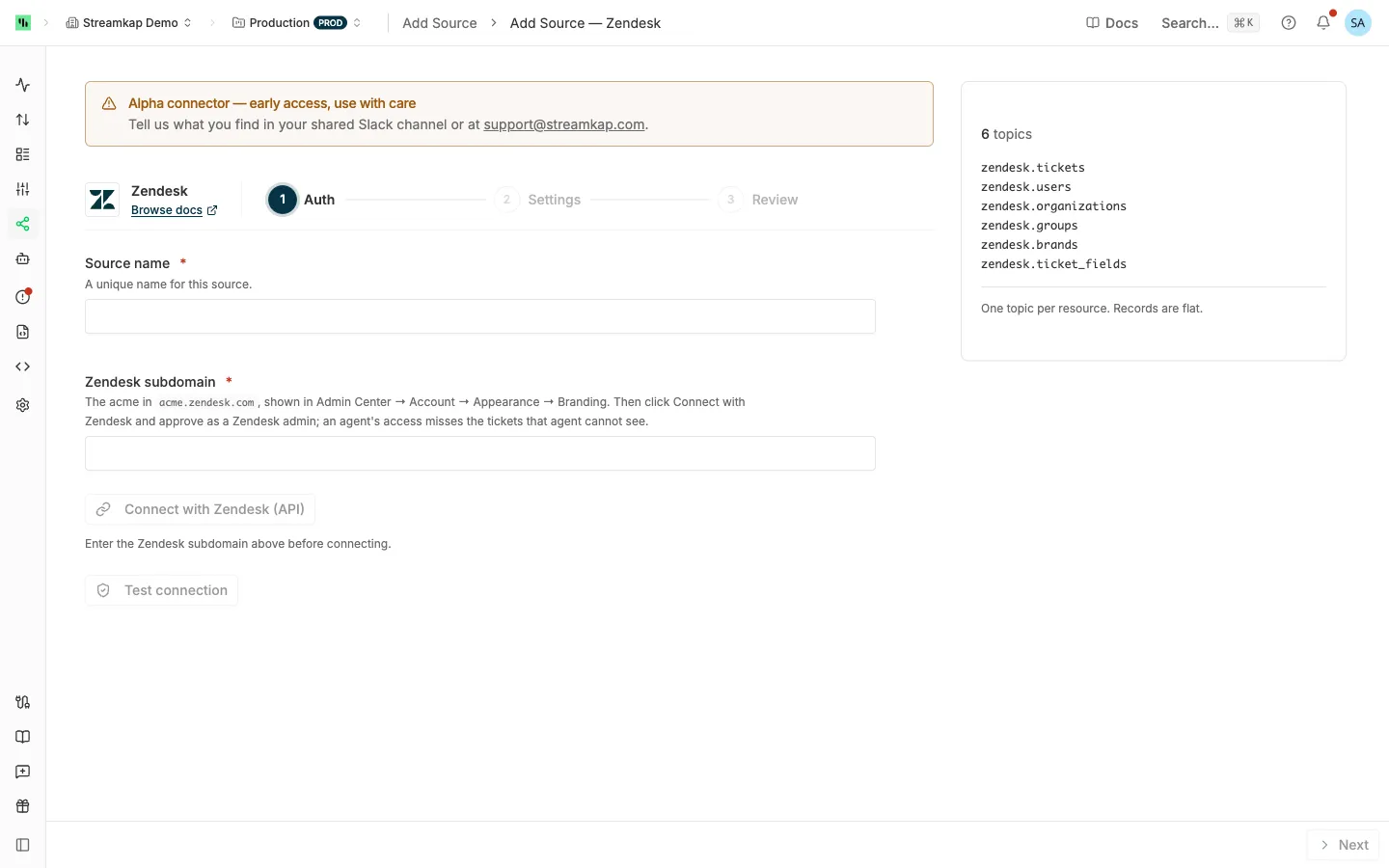
- Source name: A unique name for this source, for example
zendesk-support. - Zendesk subdomain: The
acmeinacme.zendesk.com.acme.zendesk.comandhttps://acme.zendesk.comare also accepted; Streamkap keeps the subdomain. A host-mapped domain such assupport.acme.comis refused: use thezendesk.comsubdomain it maps to. - Click Connect with Zendesk. The button waits until the subdomain is filled, and if no account exists there the form says “There is no Zendesk account at acme.zendesk.com.” In the Zendesk window, sign in as an admin and approve read access. The form then shows Connected.
Optionally click Test connection: it checks that an admin connected and reads one row of each selected resource. A resource your plan or role cannot read is reported under the Resources list, naming the plan or add-on it needs. See Test connection and Test access. Click Next.
3. Settings Tab
-
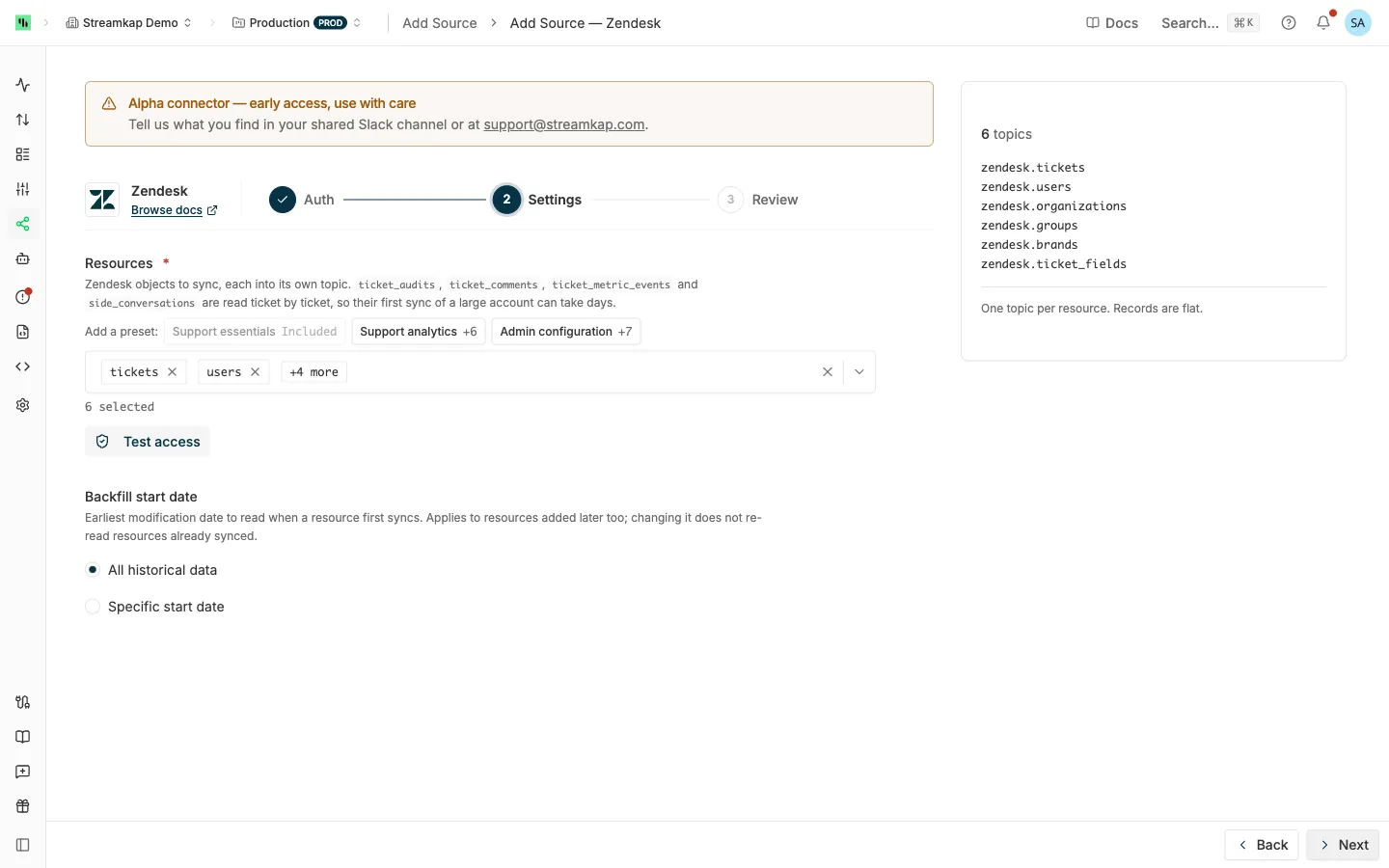
Resources: The Zendesk objects to sync, each into its own topic. The form starts with the six marked Default in Supported Resources. Add a preset adds one of these sets:
- Support essentials:
tickets,users,organizations,groups,brands,ticket_fields. - Support analytics: Support essentials plus
ticket_metrics,group_memberships,organization_memberships,user_fields,organization_fieldsandtags. - Admin configuration:
macros,automations,triggers,views,ticket_fields,user_fields,organization_fieldsandtags.
No preset includes the per-ticket resources or the resources that need a plan or add-on.
- Support essentials:
-
Backfill start date: All historical data reads back to 2007, or choose Specific start date. See Backfill start date.
4. Review and Create
Check the summary and click Create. A Zendesk account backs one source per workspace, keyed on Zendesk subdomain; see One source per vendor account. Then send the topics to a destination: see Send topics to a destination.
Staying Connected
Zendesk’s access token lasts at most two days and its refresh token 30 days. Every refresh replaces the refresh token, and Streamkap saves the new one each time.
A source paused, stopped or failing for more than 30 days must be reconnected, because its refresh token has expired. Its error reads “Zendesk rejected the connection: the authorization was removed in Zendesk Admin Center, or the source was paused or stopped for more than 30 days. Reconnect this source with Zendesk.” Open the source, click Connect with Zendesk on the Auth tab, approve as an admin, and save. The source resumes from its last position.
An admin can revoke Streamkap’s access in Zendesk Admin Center → Apps and integrations → APIs → External OAuth clients. That stops the source with the same error.
Editing the Source
- Test connection on a saved source reads through the source’s own connection, so a revoked or expired connection fails it with the reconnect message.
- Changing the subdomain needs a new Connect with Zendesk before you save. Saving without one is refused: “The Zendesk subdomain changed from acme to newacme. Reconnect this source with Zendesk to authorize the new account.”
For changing resources, see Editing an API source.
Supported Resources
Changes from is the Zendesk field copied into streamkap_changed_at, the column the source tracks its position by. “Re-read whole” lists are read hourly; everything else polls every 5 minutes.
| Resource | How it is read | Changes from | Deletes | Default | Needs |
|---|---|---|---|---|---|
tickets |
First sync: Search Export, then each ticket in full. After: List Tickets by updated_at |
created_at on the first sync, updated_at after |
deleted_tickets sweep |
Yes | |
users |
Users list sorted by updated_at |
updated_at |
deleted_users sweep, weekly reconciliation |
Yes | |
organizations |
Organizations list sorted by updated_at |
updated_at |
Weekly reconciliation | Yes | |
groups |
Re-read whole | Poll time | Gone or deleted |
Yes | |
brands |
Re-read whole, deleted brands included | Poll time | Gone or is_deleted |
Yes | Admin |
ticket_fields |
Re-read whole | Poll time | Gone | Yes | |
ticket_metrics |
With each ticket read, one row per ticket | The ticket’s | deleted_tickets sweep |
||
ticket_audits |
Per changed ticket | The ticket’s | Kept when the ticket is deleted | ||
ticket_comments |
Per changed ticket | The ticket’s | Kept when the ticket is deleted | ||
ticket_metric_events |
Per changed ticket | The ticket’s | Kept when the ticket is deleted | ||
side_conversations |
Per changed ticket | The ticket’s | Kept when the ticket is deleted | Collaboration add-on | |
user_identities |
With each user read | The user’s updated_at |
Weekly reconciliation | ||
organization_memberships |
Re-read whole, in passes that can span several polls | Pass start time | Gone | ||
group_memberships |
Re-read whole | Poll time | Gone | ||
satisfaction_ratings |
Ratings since the last pass, sorted by creation | Pass start time | None | Admin, customer satisfaction ratings turned on | |
audit_logs |
Entries since the last poll, oldest first | created_at |
None | Admin, Enterprise plan | |
ticket_forms |
Re-read whole | Poll time | Gone or deleted_at set |
Admin, Suite Growth or higher, or Support Enterprise | |
macros |
Re-read whole | Poll time | Gone | ||
automations |
Re-read whole | Poll time | Gone | ||
triggers |
Re-read whole | Poll time | Gone | ||
views |
Re-read whole | Poll time | Gone | ||
custom_statuses |
Re-read whole | Poll time | Gone | ||
user_fields |
Re-read whole | Poll time | Gone | ||
organization_fields |
Re-read whole | Poll time | Gone | ||
custom_roles |
Re-read whole | Poll time | Gone | Admin, Enterprise plan | |
sla_policies |
Re-read whole | Poll time | Gone | Admin, Suite Professional or higher | |
tags |
Re-read whole: Zendesk lists up to the 20,000 most used tags of the last 60 days. Keyed by the tag name | Poll time | Gone | ||
schedules |
Re-read whole | Poll time | Gone | Suite Professional or higher | |
schedule_holidays |
Re-read whole under each schedule | Poll time | Gone | Suite Professional or higher |
A resource your plan or the connecting user cannot read pauses on its own, naming what it needs, and recovers once you add the feature or an admin reconnects.
Not supported: Help Center (Guide), Talk and Chat; ticket_activities (Zendesk lists only the connecting agent’s own activity); ticket_skips (no time filter or cursor paging); skills-based routing attributes; Zendesk custom objects.
Behavior & Limits
No Incremental Exports
Zendesk withdraws its incremental export APIs (/api/v2/incremental/…) from third-party integrations between 17 December 2026 and 19 January 2027. This connector never uses them and reads the lists that remain. As a result, archived tickets are read only on the first sync, a deleted archived ticket is not deleted downstream, and ticket events arrive as per-ticket audits.
Tickets
- First sync: Search Export is the only listing that returns archived tickets (closed for 120 days). The connector lists ticket ids by creation time through it, then reads each ticket in full, 100 at a time. It stops ten minutes before the source started, so the search index can catch up.
- Every poll after: List Tickets sorted by
updated_at, from the last position minus five minutes, including tickets handled by an AI agent. - System updates: Some system changes move a ticket’s
generated_timestampbut not itsupdated_at, so List Tickets misses them. Once a week a walk over every ticket that is not archived re-sends each one whosegenerated_timestampmoved without itsupdated_at. A re-sent ticket keeps its ownupdated_atinstreamkap_changed_at. The first walk reaches back to the end of the first sync, so system updates made while a long first sync ran are caught too. - A long gap: List Tickets never returns an archived ticket. If a source does not read tickets for more than 120 days, tickets closed and archived in between are not read. Contact Streamkap to re-read them.
Per-Ticket Resources
ticket_audits, ticket_comments, ticket_metric_events and side_conversations are read from each changed ticket’s own list, at one request per ticket and resource. The first sync reads them for every ticket, archived ones included. For an account with 600,000 tickets that takes about a week, so none is selected by default. A changed ticket’s lists are re-sent whole, so an edit made in place, such as a redacted comment, also arrives.
A ticket that refuses its list is skipped while the others keep syncing: one deleted before its list is read, one outside the connected user’s groups, or, for side_conversations, a ticket type with no side conversations. After 100 refused tickets in a row, the resource fails with a message naming the plan or add-on it needs. Without the Collaboration add-on, Zendesk refuses every ticket’s side conversations.
Deletes
- Tickets and ticket metrics: every 6 hours a sweep reads Zendesk’s deleted tickets. Zendesk lists a deleted ticket there for 30 days and never lists a deleted archived ticket, so a deleted archived ticket stays in your destination.
- Users: every 6 hours a sweep reads Zendesk’s deleted users, permanently deleted ones included.
- Re-read lists: a row gone from a complete read, or marked deleted (
groups.deleted,brands.is_deleted,ticket_forms.deleted_at), is deleted. - Users, organizations and identities: reconciled weekly against Zendesk’s current ids.
- Per-ticket resources: Zendesk does not list a deleted ticket’s audits or comments, so they stay. Join them to
ticketsto leave them out. - Satisfaction ratings and audit logs: no delete signal.
See Deletes for how deletes arrive and the delete-coverage warning.
What Each Record Contains
- Every top-level field Zendesk returns. Nested values (custom fields,
via,tags, a macro’s actions, an audit’s events) are JSON text, so a custom field you add in Zendesk arrives insidecustom_fieldsoruser_fields, not as a new column. idis the Kafka key: Zendesk’s id, exceptticket_metrics, keyed by its ticket’s id (Zendesk’s own id ismetric_set_id), andtags, keyed by the tag name.- Per-ticket rows carry
ticket_id; holidays carryschedule_id. - Types come from Zendesk’s published API definition: ids and counts are integers, flags booleans, times ISO-8601 text.
Set the destination to upsert on id. A row is re-sent under the same id each time it changes, and can be re-sent unchanged inside the five-minute look-back.
Rate Limits
Zendesk meters requests per minute for the whole account, shared with your other integrations: 200 on Suite Team, 400 on Growth and Professional, 700 on Enterprise, up to 2,500 with High Volume.
- The connector paces itself to half of the account’s per-minute limit, which Zendesk reports on every response, with short bursts above it, and keeps List Tickets, Search Export and the deleted-tickets sweep within Zendesk’s own limits for those endpoints. Per-ticket resources read up to four tickets ahead.
- Once 80% of the account’s minute is spent, it pauses as Throttled until the minute resets.
- A
429asking to wait up to a minute is waited out; a longer one pauses the source for that long.
As a guide, the first ticket sync of an account with 600,000 tickets takes about 2 hours on a 400-a-minute plan.
Troubleshooting
"Zendesk rejected the connection … Reconnect this source with Zendesk."
The source was paused, stopped or failing for more than 30 days, or an admin revoked Streamkap’s access.
Resolution: Open the source, click Connect with Zendesk on the Auth tab, approve as an admin, and save.
"Zendesk connected a user whose role is …, not admin."
Only an admin can read every ticket and the admin-only settings.
Resolution: Click Connect with Zendesk again, signed in to Zendesk as an admin.
"Zendesk subdomain must be the acme in acme.zendesk.com …"
The value is a host-mapped domain, carries a port or a path, or is not a zendesk.com subdomain.
Resolution: Enter the acme of acme.zendesk.com, shown in Admin Center → Account → Appearance → Branding.
"The Zendesk subdomain changed from … Reconnect this source with Zendesk …"
A connection belongs to one Zendesk account.
Resolution: Click Connect with Zendesk for the new account, then save.
One resource paused
The resource needs a plan, a feature or admin access the account or the connected user lacks. Its status names what it needs.
Resolution: Turn on the feature or upgrade, reconnect as an admin, or deselect the resource.
Related Documentation
- API sources - how API sources work, Test access, editing, deletes and status.
- Zendesk Webhook - Zendesk events delivered as they happen.