

Google Ads
Stream Google Ads campaigns, ads, criteria, assets and daily performance reports into Streamkap with a service account or an OAuth refresh token.
The Google Ads source reads one Google Ads account, several, or every client account under a manager, and writes each selected resource to its own topic, source_<id>.google_ads.<resource>.
Prerequisites
- A Google Ads account, or a manager account with client accounts.
- A Google Cloud project where you can enable APIs and create OAuth clients or service accounts.
- One of:
- a Google user with at least read-only access to the accounts and 2-Step Verification turned on, or
- a service account you can add as a user of the accounts.
No developer token is needed. Google stopped using them on 9 September 2026, and API access now belongs to the Cloud project that owns the OAuth client or service account.
Google Setup
1. Enable the Google Ads API
In the Google Cloud console, select your project and enable the Google Ads API under APIs & Services → Library.
2. Get Production Access
A new project has Test access, which reads test accounts only. On the project’s Google Ads API Overview page, apply for:
- Explorer: 2,880 operations a day against production accounts.
- Basic: 15,000 operations a day.
The budget belongs to the Cloud project and is shared by every tool that uses it. See Quota.
3. Create the Credential
- Under APIs & Services → OAuth consent screen, set the consent screen to In production, or use the Internal user type. A consent screen left in Testing issues refresh tokens that expire after 7 days.
- Under APIs & Services → Credentials, create an OAuth client ID of type Web application.
- Copy the Client ID and Client secret.
Then mint a refresh token with this same client for the https://www.googleapis.com/auth/adwords scope with offline access. Google keeps at most 100 refresh tokens per user and client and silently revokes the oldest.
A service account needs no consent screen and has no 7-day Testing expiry or 100-token limit (Google’s guide).
- Under IAM & Admin → Service accounts, create a service account (it needs no Cloud role), then choose Keys → Add key → Create new key → JSON and keep the file.
- In Google Ads, open Admin → Access and security → Users and add the service account’s email (
client_emailin the key file) with read-only access. No domain-wide delegation is needed. - A service account can be added to at most 20 Google Ads accounts. For more, add it to a manager account and set Login customer ID (manager) to that manager.
4. Find Your Customer IDs
The customer ID is the ten-digit number at the top right of Google Ads, such as 123-456-7890. Dashes are optional. If you reach the account through a manager account, also note the manager’s customer ID.
Streamkap Setup
1. Create the Source
- Navigate to Add Connectors.
- Choose Google Ads.
2. Connection Settings (Auth Tab)
- Source name: A unique name for this source.
- Authentication: Service account (default) or Paste a refresh token.
- OAuth client ID, OAuth client secret and Refresh token (Paste a refresh token): From your OAuth client, and a token minted with it.
- Service account key (Service account): The whole JSON key file.
- Customer ID: The account to sync. Once the credentials are entered, the field lists the accounts they reach by name; pick one or type the ID. For a manager account, turn on Include client accounts.
- Additional customer IDs (optional): More accounts to read with the same credentials. See Several Accounts.
- Login customer ID (manager) (optional): The manager account through which the Google user or service account reaches these accounts. Leave it empty for direct access.
- Include client accounts (default off): Treat Customer ID as a manager and sync every enabled client account under it, including clients added later.
Test connection and Test access work as described in API sources. For Google Ads:
- Each search costs one operation of your project’s daily budget. The test checks at most the first 10 accounts.
- A report is read for yesterday in each account’s time zone, with its row count. A report with more than 25,000 rows a day is blocked; one with more rows a day than restatement remembers for deletes, or more accounts than it can track over the conversion window, gets a warning (see Restatement).
- A custom query runs for one day, which Google validates in full.
- Warnings that do not block saving: a test account (it serves no ads), a manager with no enabled client accounts, or an account the user does not reach directly (set Login customer ID (manager)).
3. Settings Tab
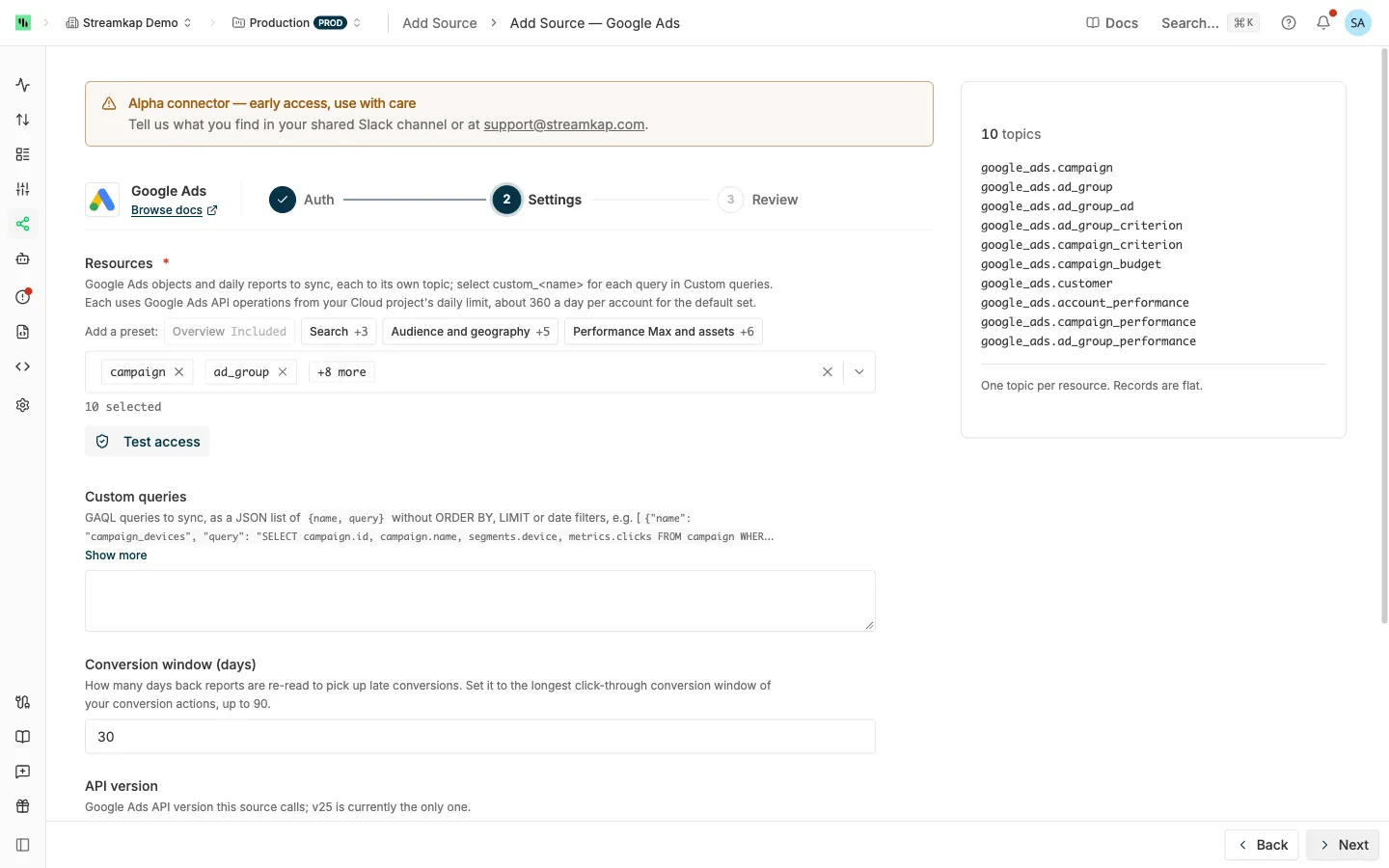
- Resources: The objects and reports to sync. The ten defaults are marked in Supported Resources and use about 360 operations a day per account. Select
custom_<name>for each query in Custom queries. Presets under Add a preset:- Overview: the ten defaults.
- Search: Overview plus
keyword_view,search_term_viewandad_group_ad_performance. - Audience and geography:
campaign,ad_group,customer,geographic_view,user_location_view,age_range_view,gender_viewandad_group_audience_view. - Performance Max and assets:
campaign,customer,asset_group,asset,campaign_asset,ad_group_asset,asset_setandcampaign_asset_set.
- Custom queries (optional): GAQL queries as a JSON list of
{name, query}. See Custom Queries. - Conversion window (days) (default 30, max 144): How many days back reports are re-read to pick up late conversions and conversion adjustments. Set it to the longest click-through conversion window of your conversion actions, plus 54 days if you upload conversion adjustments (restatements or retractions), up to 144. See Restatement.
- API version:
v25, the only version. - Backfill start date: Last two years (change history 29 days; clicks, calls and leads 90 days) or Specific start date. See Backfill and API sources.
4. Review and Create
Check the summary and click Create. A Google Ads account backs one source per workspace, keyed on Customer ID; see One source per vendor account. Then send the topics to a destination: see Send topics to a destination.
Editing the Source
- Credentials: click Replace on the client secret, refresh token or service account key and save. If you change OAuth client ID, enter the new client’s secret and a refresh token minted with it in the same save.
- Custom queries: a synced query cannot change under the same name, because its fields define the columns and the
id. The poll fails with that fix. Add the changed query under a new name.
Everything else follows Editing an API source.
Supported Resources
58 resources, plus your custom queries. Every resource reads every account of the source into one topic.
Entities
Read whole on the first poll, then only what Google’s change_status lists as changed, every 5 minutes.
| Resource | What it holds | Default |
|---|---|---|
campaign |
Campaigns: status, channel, bidding, budget, network and geo settings, dates | Yes |
ad_group |
Ad groups: status, type, bids | Yes |
ad_group_ad |
Ads: type, text, final URLs, policy summary | Yes |
ad_group_criterion |
Keywords, audiences, placements and other ad-group targeting | Yes |
campaign_criterion |
Campaign targeting: locations, languages, devices, schedules, negatives | Yes |
campaign_budget |
Budgets: amount, period, delivery method, shared flag | Yes |
ad_group_bid_modifier |
Ad-group bid adjustments | |
asset, asset_group, asset_set |
Assets, Performance Max asset groups, asset sets | |
ad_group_asset, campaign_asset, customer_asset, campaign_asset_set |
Links between assets and ad groups, campaigns or the account | |
shared_set, campaign_shared_set |
Shared negative keyword and placement lists, and the campaigns using them |
Daily Re-reads
Read whole once a day. New and changed rows are sent; a row missing from a complete read is deleted.
| Resource | What it holds | Default |
|---|---|---|
customer |
The account: name, currency, time zone, status, auto-tagging, tracking template | Yes |
customer_client |
The accounts under a manager | |
label, customer_label, campaign_label, ad_group_label, ad_group_ad_label, ad_group_criterion_label |
Labels and what they are attached to | |
bidding_strategy |
Portfolio bidding strategies | |
campaign_bid_modifier |
Campaign bid adjustments | |
audience, user_interest |
Audiences, and Google’s interest categories | |
local_services_lead |
Local Services leads | |
geo_target_constant |
Google’s location list, read weekly |
Logs
Read hourly by their own timestamp. Each row is written once.
| Resource | What it holds |
|---|---|
change_event |
Who changed what and when, with old and new values. Google keeps 30 days. |
call_view |
Calls: caller area, duration, status |
lead_form_submission_data |
Lead-form submissions |
local_services_lead_conversation |
Messages and calls on Local Services leads |
Reports
One row per day per key, in the account’s time zone, re-read hourly for the conversion window. Each report selects the standard metrics its resource allows: impressions, clicks, cost, conversions and value, all conversions, view-through conversions, interactions, video views, CTR, average CPC and CPM, search impression share and Active View metrics.
| Resource | One row per day per | Default |
|---|---|---|
account_performance |
account | Yes |
campaign_performance |
campaign | Yes |
ad_group_performance |
ad group | Yes |
account_performance_by_network_device, campaign_performance_by_network_device, ad_group_performance_by_network_device |
…, network and device | |
account_performance_hourly, campaign_performance_hourly, ad_group_performance_hourly |
…, and hour | |
campaign_budget_performance |
budget | |
ad_group_ad_performance |
ad, network and device | |
keyword_view |
keyword | |
search_term_view |
search term and ad group | |
display_keyword_view, topic_view |
Display keyword or topic | |
geographic_view, user_location_view, location_view |
country and location type, user location, or targeted location | |
shopping_performance_view |
product, channel and device | |
age_range_view, gender_view |
age range or gender, and device | |
ad_group_audience_view |
audience, network and device | |
landing_page_view |
landing page | |
click_view |
click (GCLID). Google serves one day per query and keeps 90 days. |
change_status is not a topic: it drives the entities. Select change_event for the change history.
Custom Queries
Custom queries is a JSON list of {name, query}. Select each as custom_<name>. Google’s Query Builder helps write them.
[
  {"name": "campaign_devices", "query": "SELECT campaign.id, campaign.name, segments.device, metrics.clicks, metrics.cost_micros FROM campaign WHERE campaign.status = 'ENABLED'"}
]- Write
SELECT,FROMand an optionalWHERE.ORDER BY,LIMIT,PARAMETERSand date filters are refused: Streamkap sets them. - A query with metrics is a report: Streamkap adds
segments.dateand re-reads it for the conversion window. ItsFROMmust allowsegments.date. - A query without metrics is re-read whole daily, like the daily re-reads.
FROM change_status,change_eventandclick_vieware refused; use their resources.- Each query is checked on save against Google’s field list for the API version: fields must exist, be selectable (and filterable where filtered) and be compatible with the
FROMresource.
Behavior & Limits
Record Columns
- Column names are the GAQL field names with
.replaced by_, such ascampaign_idandmetrics_clicks. A name over 63 characters keeps its first 54 characters plus a short hash. idis the Kafka key. For an entity, daily re-read or log it is the resource name, such ascustomers/1234567890/campaigns/2001. For a report it is the resource name, then any segmenting resource names, the date and each other selected segment, joined with|, such ascustomers/1234567890/campaigns/2001|2026-09-24|MOBILE.customer_idnames the account the row came from.- Columns come from the field map pinned for the API version, not from your account; a new API version only adds columns.
- Entities also carry
streamkap_changed_at(UTC),change_status_last_change_date_time(Google’s time, in the account’s time zone) andchange_status_resource_status. - 64-bit numbers (ids,
cost_micros,impressions,clicks) are integers, other metrics doubles, enums their names, datesYYYY-MM-DD, nested messages and lists JSON text. A field Google omits takes its default (0,false, empty string orUNSPECIFIED). - Money is in micros of the account’s currency:
cost_micros1,500,000 is 1.50.
Backfill
The Backfill start date bounds each resource’s first sync only:
- Reports start on that date, or two years back by default, never more than 37 months back.
click_viewreads at most 90 days. - Logs start on that date, or 90 days back by default.
change_eventreads at most 29 days. - Entities and daily re-reads are always read whole.
Restatement
Google keeps attributing conversions to past clicks. Each hourly poll re-reads the last Conversion window (days) of every report and re-sends rows whose values changed, under the same id. Set the destination to upsert on id, and never sum a report topic.
- A day whose rows are unchanged is not re-sent. A day that changed is re-sent whole, however wide the window.
- A row Google stops serving, such as one whose metrics fell to zero after its conversions were retracted, is deleted: the destination receives a delete for its
id. Streamkap remembers 10,000 report rows across the window for this, about 320 rows a day at 30 days and 68 at 144; past that, a row that disappears from the oldest days keeps its last values. - A day an account could not be read in full (a quota hold or a refused account) deletes nothing until a later poll reads it whole.
- Streamkap tracks 5,000 account-days per report, such as 34 accounts at 144 days. Past that, the oldest days are re-sent on every poll; shorten the conversion window or split the accounts across sources.
- Google accepts conversion adjustments (retractions and restatements) up to 54 days after the conversion, and a conversion lands up to 90 days after its click. If you upload adjustments, set the window to your conversion window plus 54 days (up to 144) so the days they change are still re-read.
Entity Changes and Removals
Each poll reads change_status from where the last one stopped, minus an hour to cover daylight-saving changes, and refetches each changed entity whole. Google lists a change up to three minutes after it happens.
Every entity is also re-read whole every 7 days, to catch changes Google makes itself that change_status may not list, and after a pause longer than 88 days (change_status keeps 90).
A removed campaign, ad group, ad or criterion arrives as an upsert with status REMOVED, not as a delete, so its spend in the reports keeps a matching row. One Google no longer returns arrives as its key, REMOVED and the change columns.
Several Accounts
Additional customer IDs and Include client accounts add accounts to Customer ID. Client accounts under a manager are looked up again every hour. Every row carries its customer_id, and each account’s reports use its own time zone.
An account added after a report has synced reads that report’s history from its first day, within the Backfill start date. To backfill its logs, reset the source.
When Google refuses one account (no access, not enabled, or a metric unavailable to it), that account is skipped with a warning, its existing rows stay, and each poll retries it. Once it answers, reports read the days it missed. When the source reads one account, or every account is refused, the refusal applies to the whole source; a metric refused on every account pauses only that report.
Quota
Google counts operations per Cloud project over a rolling 24 hours. Each search is one operation; extra pages are free; a refused request still counts. The default selection costs about 360 a day per account.
- Project budget spent: the source shows Throttled until Google’s retry delay, or an hour, then resumes.
- One account’s budget spent: that account pauses and the others continue. A report advances only as far as the paused account can catch up.
- Short-term rate limit: the request waits Google’s retry delay, up to a minute, and retries.
To use fewer operations, select fewer resources or apply for Basic access.
Cadence
- Entities: every 5 minutes.
- Reports and logs: hourly.
- Daily re-reads: daily;
geo_target_constantweekly.
Troubleshooting
"Google rejected the refresh token …" or "Google rejected the OAuth client or refresh token …"
The token was revoked, unused for six months, dropped past Google’s 100-token limit, or issued by a consent screen in Testing, whose tokens expire after 7 days.
Resolution: Set the consent screen to In production, or use the Internal user type. Then mint a new refresh token with the same client, paste it with Replace on the Auth tab, and save.
"… has no access to Google Ads" or "Google requires 2-Step Verification …"
The Google user behind the token cannot sign in to Google Ads, or has not turned on 2-Step Verification, which the manager account enforces.
Resolution: Give the user access or turn on 2-Step Verification, then connect again or paste a new token minted by that user.
"The Google Cloud project that owns this OAuth client (or service account) has only Test access"
Resolution: Apply for Explorer or Basic access on the project’s Google Ads API Overview page. See Get Production Access.
"Account … is a manager account"
A manager has no campaigns or metrics of its own.
Resolution: Put a client account in Customer ID and the manager in Login customer ID (manager), or turn on Include client accounts.
"Google Ads denied the Google user who authorized the OAuth client access to account …"
Resolution: Grant the user access under Admin → Access and security in Google Ads, or set Login customer ID (manager) to the manager that gives access.
"Google Ads denied the service account … access to account …"
Resolution: Add the service account’s email under Admin → Access and security → Users on that account, or set Login customer ID (manager) to the manager you added it to.
"Google rejected the service account key"
The key or its service account was deleted or disabled, or the pasted text is not the key file.
Resolution: Create a new JSON key under IAM & Admin → Service accounts → Keys → Add key, paste it with Replace, and save.
"Login customer ID … does not manage account …"
Resolution: Set it to the manager above the account, or clear it for direct access.
Numbers differ from Google Ads
Recent days are still being revised for conversions. Compare a day older than the conversion window (plus 54 days if you upload conversion adjustments), in the account’s time zone, and compare the same conversion columns (metrics_conversions or metrics_all_conversions).
Related Documentation
- API sources - how API sources work and how to send their topics to a destination
- Google Analytics 4 - daily GA4 reports, preset or your own
- Facebook Ads - Meta ad objects and daily insights reports