> ## Documentation Index
> Fetch the complete documentation index at: https://docs.streamkap.com/llms.txt
> Use this file to discover all available pages before exploring further.
# Ingestion Modes
> Understand how Streamkap writes records to destinations: insert vs upsert behavior, primary keys, and delete handling.
For real-time data streaming, the **Insert** method is typically the **fastest** at loading data and the **most cost-effective**.
Streamkap Destinations support one or more of the following ingestion modes:
## Insert
This method inserts each change as a new record in the destination.
For example, if you have an e-commerce record where the order status has changed, you will have two change events: one showing the status *before* and one *after*.
This is useful for tracking data changes and optimizing data loading for some destinations. When choosing this method, consider when to clean up older records, as it affects query performance. Users may prefer not to include additional clauses in their queries to filter out older records, so creating views on top of the change data to retrieve only the latest state (i.e., the *after* change event) can simplify usage.
## Upsert
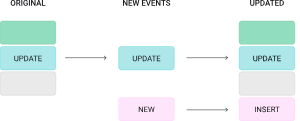
Upserts replace a matching record (based on a [primary key](#primary-key-modes)) to avoid retaining older versions in the destination -- a common approach in batch data processing.
For example, if you have an e-commerce record where the order status has changed, instead of having two records, you retain only the latest state (i.e., the *after* change event).
This is summarised in the image below:
 However, upserting a record isn't as fast as inserting one. Still, it eliminates the need to modify queries to filter out older records or to create additional views for retrieving the latest state.
## Primary Key Modes
Primary key mode controls how the destination connector resolves the primary key columns for each table. The primary key determines how records are matched during upsert operations, deduplication, and delete handling.
This setting is available on **JDBC destinations**: PostgreSQL, MySQL, Oracle, SQL Server, CockroachDB, Db2, and Neon.
Snowflake and ClickHouse do not use primary key mode. They handle deduplication through their own ingestion mode logic. See [Snowflake](/snowflake) and [ClickHouse](/clickhouse) for details.
There are three primary key modes available:
### `record_key` (default)
Uses the message key -- typically the source table's primary key -- as the primary key in the destination table.
This is the recommended mode for most Change Data Capture (CDC) use cases because the source primary key naturally identifies each record. When a record is updated or deleted in the source, the destination can match it by the same key.
**When to use:**
* Standard CDC replication where the source table has a primary key
* You want the destination table's primary key to match the source table's primary key
* You need upsert or delete support
### `record_value`
Derives the primary key from one or more fields within the message value (the record payload) rather than the message key.
This is useful when the message key does not contain the fields you want to use as the destination primary key, or when you need a composite key based on payload fields.
**When to use:**
* The message key does not match your desired destination primary key
* You need a composite primary key derived from specific payload fields
* Custom key logic is required for the destination table
When using `record_value`, you should specify the field(s) in the **Custom primary key** setting. Provide a single field name or a comma-separated list of fields.
### `none`
No primary key is enforced on the destination table. Every record is inserted as a new row regardless of whether a matching record already exists.
**When to use:**
* Append-only or log-style tables where you want to retain every change event
* Audit trails or event history tables
* Scenarios where deduplication is not needed
With `none` mode, upsert behavior is disabled. The connector cannot match existing records, so all events result in inserts. Delete operations are also not supported in this mode.
### Custom Primary Key
When primary key mode is set to `record_key` or `record_value`, you can optionally specify a **Custom primary key**. This accepts either:
* A single column name (e.g., `order_id`)
* A comma-separated list of column names for a composite key (e.g., `order_id,line_item_id`)
If left empty with `record_key` mode, the connector uses the full message key structure. If left empty with `record_value` mode, the connector uses all fields from the record value as the key, which is rarely the desired behavior -- so specifying fields explicitly is strongly recommended.
### Applicable Destinations
Primary key mode is available on the following JDBC destinations:
| Destination | Supports PK Mode | Default Mode |
| ------------------------------------- | ---------------- | ------------ |
| [PostgreSQL](/stream-into-postgresql) | Yes | `record_key` |
| [MySQL](/stream-into-mysql) | Yes | `record_key` |
| [Oracle](/stream-into-oracle) | Yes | `record_key` |
| [SQL Server](/stream-into-sqlserver) | Yes | `record_key` |
| [CockroachDB](/cockroachdb) | Yes | `record_key` |
| [Db2](/stream-into-db2) | Yes | `record_key` |
| [Neon](/neon-destination) | Yes | `record_key` |
## Delete Handling
When a row is deleted in a source database, Streamkap's CDC pipeline captures that event and propagates it to the destination. How that delete is applied -- whether the row is physically removed, marked as deleted, or simply appended as a new event -- depends on the **ingestion mode** and the **delete configuration** of your destination connector.
### How Deletes Flow
A delete event follows these steps from source to destination:
1. **Source database**: A row is deleted (e.g., `DELETE FROM orders WHERE id = 42`). The database records this operation in its transaction log (WAL, binlog, redo log, etc.).
2. **CDC capture**: Streamkap reads the delete event from the transaction log and produces a message to the internal Kafka topic. This message includes the primary key of the deleted row and a delete marker (sometimes called a *tombstone*).
3. **Kafka message**: The delete event is stored as a Kafka message with the row's primary key and metadata indicating a delete operation.
4. **Destination connector**: The destination connector consumes the message and applies the delete according to the configured **ingestion mode** and **delete mode** settings.
Delete events require a **primary key** to identify which row was deleted. Tables without a primary key may not propagate deletes correctly. Ensure your source tables have a primary key defined.
### Delete Behavior Matrix
The outcome of a delete event at the destination depends on two factors: the **ingestion mode** (insert or upsert) and whether **delete mode is enabled**.
| Ingestion Mode | Delete Enabled | What Happens at the Destination |
| ------------------- | -------------- | ------------------------------------------------------------------------------------------------------------------- |
| **Upsert** | Yes | The row is **physically removed** from the destination table. |
| **Upsert** | No | Depends on destination type (see note below). |
| **Insert / Append** | N/A | A new row is **appended** with the `__DELETED` column set to `'true'`. The original row is not modified or removed. |
The behavior when delete mode is disabled differs by destination type:
* **JDBC destinations** (Delete mode off): Delete events are ignored entirely. The row remains at the destination unchanged.
* **Snowflake and ClickHouse** (Delete Mode off): The row remains but the `__DELETED` column is set to `'true'` (soft delete).
**Which mode should I use?**
* Use **upsert with delete enabled** when you want the destination to mirror the source exactly -- deleted rows are removed.
* Use **upsert with delete disabled** when you want to retain deleted rows for auditing or compliance, but still deduplicate on primary key.
* Use **insert/append** when you need a full change history, including deletes, as an append-only event log.
### Configuring Delete Mode
The setting name and behavior vary depending on your destination connector type.
#### JDBC Destinations
Applies to: **PostgreSQL**, **MySQL**, **Oracle**, **SQL Server**, **CockroachDB**, **Db2**, **Neon**
| Setting | **Delete mode** |
| -------------------------- | ------------------------------------------------------------------------------------------ |
| **Type** | Boolean |
| **Default** | Off (deletes are not processed) |
| **Where to configure** | Destination connector settings |
| **Behavior when enabled** | DELETE or tombstone events cause the corresponding row to be removed from the destination. |
| **Behavior when disabled** | Delete events are ignored. The row remains at the destination unchanged. |
**Redshift** also supports Delete mode. Check your Redshift destination settings for the current configuration.
For JDBC destinations, delete mode works with both **insert** and **upsert** ingestion modes. However, physical row removal only occurs in **upsert** mode. In **insert** mode, delete events are appended as new rows with the `__DELETED` metadata column set to `'true'`.
#### Snowflake and ClickHouse
| Setting | **Delete Mode** |
| -------------------------- | ------------------------------------------------------------------------------------------------ |
| **Type** | Boolean |
| **Default** | On (deletes are processed) |
| **Applies to** | **Upsert mode only** |
| **Where to configure** | Destination connector settings |
| **Behavior when enabled** | DELETE or tombstone events cause the corresponding row to be removed from the destination table. |
| **Behavior when disabled** | The row remains at the destination. The `__DELETED` column is set to `'true'`. |
The Delete Mode setting only applies when the Snowflake or ClickHouse destination is configured in **upsert** mode. In **append** mode, delete events are always appended as new rows with the `__DELETED` column, regardless of this setting.
#### Other Destinations
For other destinations (BigQuery, Databricks, S3, MotherDuck), check your specific destination documentation for delete mode availability.
### The `__DELETED` Column
Streamkap adds a `__DELETED` metadata column to destination tables. This column indicates whether the corresponding row has been deleted in the source database.
| Value | Meaning |
| --------- | ------------------------------------------------------------- |
| `'false'` | The row exists (has not been deleted) in the source database. |
| `'true'` | The row has been deleted in the source database. |
**When `__DELETED` appears:**
* **Insert/append mode**: Every row includes the `__DELETED` column. Delete events are appended as new rows with `__DELETED = 'true'`.
* **Upsert mode with delete disabled (Snowflake/ClickHouse)**: The existing row is updated with `__DELETED = 'true'` instead of being removed.
* **Upsert mode with delete disabled (JDBC)**: Delete events are ignored. The row remains unchanged.
* **Upsert mode with delete enabled**: Deleted rows are physically removed, so you will not typically see `__DELETED = 'true'` rows in the destination (they are removed upon processing).
**Using `__DELETED` for soft deletes:**
If you are using **insert/append** mode or **upsert mode with delete disabled**, you can filter out deleted rows in your queries:
```sql theme={null}
-- Get only active (non-deleted) rows
SELECT *
FROM my_table
WHERE __DELETED = 'false';
```
This pattern is commonly used when building **final-state tables** or **materialized views** from append-only data. See [Creating Final State Tables](/creating-final-state-tables-from-insertsappend) for detailed examples with Snowflake Dynamic Tables, Tasks, and dbt models.
For a full list of metadata columns Streamkap adds, see [Metadata](/metadata).
### Truncate Events
Truncate event handling may vary by destination. Contact support for details on truncate behavior for your specific destination type.
## How Modes Interact
The primary key mode, ingestion mode, and delete mode work together to determine how records are delivered to the destination. The table below shows how these settings interact.
When **Delete mode** is enabled on JDBC destinations, the primary key mode is automatically set to `record_key`. This is because delete operations require a stable, well-defined primary key to identify which row to remove.
If you do not see the primary key mode option in the destination settings, check whether delete mode is enabled. Disabling delete mode will reveal the primary key mode selector.
| Primary Key Mode | Ingestion Mode | Delete Enabled | Behavior |
| ---------------- | -------------- | -------------- | ------------------------------------------------------------------------------------------------------------------------------------------------------------------------------------------ |
| `record_key` | Upsert | Yes | Rows are upserted by source PK. Deletes physically remove the matching row. |
| `record_key` | Upsert | No | Rows are upserted by source PK. Delete behavior depends on destination type: JDBC ignores delete events; Snowflake/ClickHouse sets `__DELETED = 'true'`. |
| `record_key` | Insert | Yes / No | Each change is appended as a new row. Delete events are appended with `__DELETED = 'true'`. |
| `record_value` | Upsert | N/A | Rows are upserted by the specified payload fields. Delete events may not propagate correctly because tombstone records have a `null` value, so the connector cannot extract a primary key. |
| `record_value` | Insert | N/A | Each change is appended as a new row. Delete events are appended with `__DELETED = 'true'`. |
| `none` | Insert | N/A | All records are appended (insert-only). No deduplication or delete support. Delete events are appended with `__DELETED = 'true'`. |
If you need delete events to be applied at the destination (physical row removal or soft-delete updates), use `record_key` primary key mode with **upsert** ingestion mode. Other primary key modes either cannot resolve the target row for a delete or treat all records as append-only.
**Decision matrix for choosing primary key mode:**
| Use Case | Recommended Mode | Delete Support | Custom PK |
| ------------------------------------- | ----------------------- | -------------------------- | --------- |
| Standard CDC replication | `record_key` | Yes | Optional |
| Destination PK differs from source PK | `record_value` | No (requires `record_key`) | Required |
| Composite key from payload fields | `record_value` | No (requires `record_key`) | Required |
| Append-only / event log table | `none` | No | N/A |
| Delete handling required | `record_key` (auto-set) | Yes | Optional |
## Delivery Guarantees
Streamkap provides **at-least-once** delivery:
* Every change is delivered at least once
* In failure scenarios, some events may be delivered more than once
* **Upsert mode** handles duplicates automatically via primary key deduplication
* **Insert/append mode** may result in duplicate rows -- use [metadata columns](/metadata) (`_STREAMKAP_TS_MS` and `_STREAMKAP_OFFSET`) to deduplicate at query time
See [Creating Final State Tables](/creating-final-state-tables-from-insertsappend) for deduplication patterns using Snowflake Dynamic Tables, Tasks, and dbt models.
## Troubleshooting
If you see duplicate rows in your destination table for the same logical record:
* **Check primary key mode.** If the mode is `none`, duplicates are expected because every event is inserted as a new row. Switch to `record_key` or `record_value` if you need upsert (deduplication) behavior.
* **Check the Custom primary key setting.** If you are using `record_value` mode without specifying the primary key fields, the connector may use all payload fields as the key, which can produce unexpected matching behavior. Specify the correct field(s) explicitly.
* **Check for schema changes.** If the source table's primary key changed, existing destination rows keyed on the old primary key will not match new records keyed on the updated primary key. A [snapshot](/snapshots#snapshotting-after-schema-changes) may be needed.
* **Check destination table DDL.** Ensure the destination table has a primary key or unique constraint defined on the expected columns. Some destinations require this for upsert behavior to work.
If records are being inserted as new rows instead of updating existing rows:
* **Verify ingestion mode.** Upsert behavior requires the ingestion mode to be set to **upsert** on the destination connector. If the mode is set to **insert**, all records are appended regardless of primary key mode.
* **Verify primary key mode.** Upsert requires either `record_key` or `record_value` mode. The `none` mode does not support upserts.
* **Verify the destination supports upserts.** Not all destination types support upsert operations. Check your destination's documentation for details.
* **Check Custom primary key alignment.** The fields specified in the Custom primary key setting must match columns that exist in the destination table and are defined as the primary key or unique key.
If delete events from the source are not removing rows at the destination:
* **Check delete mode.** Delete handling requires **Delete mode** to be enabled on the destination connector. When delete mode is enabled on JDBC destinations, the primary key mode is automatically set to `record_key`.
* **Check primary key mode.** Only `record_key` mode supports delete propagation. If you are using `record_value` or `none`, delete events cannot be matched to destination rows.
* **Check source configuration.** For MySQL/MariaDB sources, ensure `binlog_row_image` is set to `FULL` so that delete events contain the full row data needed for matching.
* **Check ingestion mode.** Delete handling (physical row removal) requires **upsert** ingestion mode. Insert-only mode does not process deletes -- it appends them as new rows with `__DELETED = 'true'`.
There are several common reasons why a deleted row may still appear at the destination:
1. **Delete mode is disabled.** Check your destination connector settings and verify that **Delete mode** is enabled.
2. **You are using insert/append mode.** In insert mode, delete events do not remove existing rows. Instead, a new row is appended with `__DELETED = 'true'`. The original row remains. This is expected behavior -- filter on `WHERE __DELETED = 'false'` to see only active rows.
3. **The source table has no primary key.** Delete events require a primary key to identify which row to remove. If your source table lacks a primary key, the delete event may not be applied correctly at the destination.
4. **There is pipeline lag.** The delete event may not have been processed yet. Check the pipeline status and consumer lag in the [Streamkap UI](https://app.streamkap.com).
Use one of these approaches:
* **Insert/append mode**: All changes, including deletes, are appended as new rows. Query with `WHERE __DELETED = 'false'` to see only active records.
* **Upsert mode with delete disabled**: The row stays at the destination but its `__DELETED` column is updated to `'true'`. You retain the latest state of every row, including those that have been deleted.
A tombstone is a Kafka message with a valid key but a `null` value. In CDC, tombstones represent delete events -- they indicate that the row identified by the key has been removed from the source database. Streamkap processes tombstones according to your destination's delete mode configuration.
MySQL (including all 8.x versions) does not log `ON DELETE CASCADE` events to the binlog. InnoDB handles foreign key cascades internally. This means child table DELETE events from cascading foreign keys are NOT captured by CDC -- only the parent table delete is propagated. This is a MySQL limitation, not a Streamkap limitation.
If you rely on cascading deletes in MySQL, verify that child table deletions are reflected at the destination by checking the child tables directly. Consider using application-level deletes instead of database-level cascades if full CDC coverage is required.
Yes. Delete events include the full primary key (all key columns) from the source table. The destination connector uses all key columns to identify and remove the correct row.
Streamkap processes events in order. If a row is deleted and then a new row with the same primary key is inserted:
* **Upsert mode with delete enabled**: The row is first removed, then re-inserted with the new values.
* **Insert/append mode**: Both events are appended -- a delete event (`__DELETED = 'true'`) followed by an insert event (`__DELETED = 'false'`).
## Related Documentation
* [Metadata](/metadata) -- Metadata columns added by Streamkap for deduplication and tracking
* [Creating Final State Tables](/creating-final-state-tables-from-insertsappend) -- How to build deduplicated views from append-only data
* [Snapshots](/snapshots) -- How initial and incremental snapshots work
However, upserting a record isn't as fast as inserting one. Still, it eliminates the need to modify queries to filter out older records or to create additional views for retrieving the latest state.
## Primary Key Modes
Primary key mode controls how the destination connector resolves the primary key columns for each table. The primary key determines how records are matched during upsert operations, deduplication, and delete handling.
This setting is available on **JDBC destinations**: PostgreSQL, MySQL, Oracle, SQL Server, CockroachDB, Db2, and Neon.
Snowflake and ClickHouse do not use primary key mode. They handle deduplication through their own ingestion mode logic. See [Snowflake](/snowflake) and [ClickHouse](/clickhouse) for details.
There are three primary key modes available:
### `record_key` (default)
Uses the message key -- typically the source table's primary key -- as the primary key in the destination table.
This is the recommended mode for most Change Data Capture (CDC) use cases because the source primary key naturally identifies each record. When a record is updated or deleted in the source, the destination can match it by the same key.
**When to use:**
* Standard CDC replication where the source table has a primary key
* You want the destination table's primary key to match the source table's primary key
* You need upsert or delete support
### `record_value`
Derives the primary key from one or more fields within the message value (the record payload) rather than the message key.
This is useful when the message key does not contain the fields you want to use as the destination primary key, or when you need a composite key based on payload fields.
**When to use:**
* The message key does not match your desired destination primary key
* You need a composite primary key derived from specific payload fields
* Custom key logic is required for the destination table
When using `record_value`, you should specify the field(s) in the **Custom primary key** setting. Provide a single field name or a comma-separated list of fields.
### `none`
No primary key is enforced on the destination table. Every record is inserted as a new row regardless of whether a matching record already exists.
**When to use:**
* Append-only or log-style tables where you want to retain every change event
* Audit trails or event history tables
* Scenarios where deduplication is not needed
With `none` mode, upsert behavior is disabled. The connector cannot match existing records, so all events result in inserts. Delete operations are also not supported in this mode.
### Custom Primary Key
When primary key mode is set to `record_key` or `record_value`, you can optionally specify a **Custom primary key**. This accepts either:
* A single column name (e.g., `order_id`)
* A comma-separated list of column names for a composite key (e.g., `order_id,line_item_id`)
If left empty with `record_key` mode, the connector uses the full message key structure. If left empty with `record_value` mode, the connector uses all fields from the record value as the key, which is rarely the desired behavior -- so specifying fields explicitly is strongly recommended.
### Applicable Destinations
Primary key mode is available on the following JDBC destinations:
| Destination | Supports PK Mode | Default Mode |
| ------------------------------------- | ---------------- | ------------ |
| [PostgreSQL](/stream-into-postgresql) | Yes | `record_key` |
| [MySQL](/stream-into-mysql) | Yes | `record_key` |
| [Oracle](/stream-into-oracle) | Yes | `record_key` |
| [SQL Server](/stream-into-sqlserver) | Yes | `record_key` |
| [CockroachDB](/cockroachdb) | Yes | `record_key` |
| [Db2](/stream-into-db2) | Yes | `record_key` |
| [Neon](/neon-destination) | Yes | `record_key` |
## Delete Handling
When a row is deleted in a source database, Streamkap's CDC pipeline captures that event and propagates it to the destination. How that delete is applied -- whether the row is physically removed, marked as deleted, or simply appended as a new event -- depends on the **ingestion mode** and the **delete configuration** of your destination connector.
### How Deletes Flow
A delete event follows these steps from source to destination:
1. **Source database**: A row is deleted (e.g., `DELETE FROM orders WHERE id = 42`). The database records this operation in its transaction log (WAL, binlog, redo log, etc.).
2. **CDC capture**: Streamkap reads the delete event from the transaction log and produces a message to the internal Kafka topic. This message includes the primary key of the deleted row and a delete marker (sometimes called a *tombstone*).
3. **Kafka message**: The delete event is stored as a Kafka message with the row's primary key and metadata indicating a delete operation.
4. **Destination connector**: The destination connector consumes the message and applies the delete according to the configured **ingestion mode** and **delete mode** settings.
Delete events require a **primary key** to identify which row was deleted. Tables without a primary key may not propagate deletes correctly. Ensure your source tables have a primary key defined.
### Delete Behavior Matrix
The outcome of a delete event at the destination depends on two factors: the **ingestion mode** (insert or upsert) and whether **delete mode is enabled**.
| Ingestion Mode | Delete Enabled | What Happens at the Destination |
| ------------------- | -------------- | ------------------------------------------------------------------------------------------------------------------- |
| **Upsert** | Yes | The row is **physically removed** from the destination table. |
| **Upsert** | No | Depends on destination type (see note below). |
| **Insert / Append** | N/A | A new row is **appended** with the `__DELETED` column set to `'true'`. The original row is not modified or removed. |
The behavior when delete mode is disabled differs by destination type:
* **JDBC destinations** (Delete mode off): Delete events are ignored entirely. The row remains at the destination unchanged.
* **Snowflake and ClickHouse** (Delete Mode off): The row remains but the `__DELETED` column is set to `'true'` (soft delete).
**Which mode should I use?**
* Use **upsert with delete enabled** when you want the destination to mirror the source exactly -- deleted rows are removed.
* Use **upsert with delete disabled** when you want to retain deleted rows for auditing or compliance, but still deduplicate on primary key.
* Use **insert/append** when you need a full change history, including deletes, as an append-only event log.
### Configuring Delete Mode
The setting name and behavior vary depending on your destination connector type.
#### JDBC Destinations
Applies to: **PostgreSQL**, **MySQL**, **Oracle**, **SQL Server**, **CockroachDB**, **Db2**, **Neon**
| Setting | **Delete mode** |
| -------------------------- | ------------------------------------------------------------------------------------------ |
| **Type** | Boolean |
| **Default** | Off (deletes are not processed) |
| **Where to configure** | Destination connector settings |
| **Behavior when enabled** | DELETE or tombstone events cause the corresponding row to be removed from the destination. |
| **Behavior when disabled** | Delete events are ignored. The row remains at the destination unchanged. |
**Redshift** also supports Delete mode. Check your Redshift destination settings for the current configuration.
For JDBC destinations, delete mode works with both **insert** and **upsert** ingestion modes. However, physical row removal only occurs in **upsert** mode. In **insert** mode, delete events are appended as new rows with the `__DELETED` metadata column set to `'true'`.
#### Snowflake and ClickHouse
| Setting | **Delete Mode** |
| -------------------------- | ------------------------------------------------------------------------------------------------ |
| **Type** | Boolean |
| **Default** | On (deletes are processed) |
| **Applies to** | **Upsert mode only** |
| **Where to configure** | Destination connector settings |
| **Behavior when enabled** | DELETE or tombstone events cause the corresponding row to be removed from the destination table. |
| **Behavior when disabled** | The row remains at the destination. The `__DELETED` column is set to `'true'`. |
The Delete Mode setting only applies when the Snowflake or ClickHouse destination is configured in **upsert** mode. In **append** mode, delete events are always appended as new rows with the `__DELETED` column, regardless of this setting.
#### Other Destinations
For other destinations (BigQuery, Databricks, S3, MotherDuck), check your specific destination documentation for delete mode availability.
### The `__DELETED` Column
Streamkap adds a `__DELETED` metadata column to destination tables. This column indicates whether the corresponding row has been deleted in the source database.
| Value | Meaning |
| --------- | ------------------------------------------------------------- |
| `'false'` | The row exists (has not been deleted) in the source database. |
| `'true'` | The row has been deleted in the source database. |
**When `__DELETED` appears:**
* **Insert/append mode**: Every row includes the `__DELETED` column. Delete events are appended as new rows with `__DELETED = 'true'`.
* **Upsert mode with delete disabled (Snowflake/ClickHouse)**: The existing row is updated with `__DELETED = 'true'` instead of being removed.
* **Upsert mode with delete disabled (JDBC)**: Delete events are ignored. The row remains unchanged.
* **Upsert mode with delete enabled**: Deleted rows are physically removed, so you will not typically see `__DELETED = 'true'` rows in the destination (they are removed upon processing).
**Using `__DELETED` for soft deletes:**
If you are using **insert/append** mode or **upsert mode with delete disabled**, you can filter out deleted rows in your queries:
```sql theme={null}
-- Get only active (non-deleted) rows
SELECT *
FROM my_table
WHERE __DELETED = 'false';
```
This pattern is commonly used when building **final-state tables** or **materialized views** from append-only data. See [Creating Final State Tables](/creating-final-state-tables-from-insertsappend) for detailed examples with Snowflake Dynamic Tables, Tasks, and dbt models.
For a full list of metadata columns Streamkap adds, see [Metadata](/metadata).
### Truncate Events
Truncate event handling may vary by destination. Contact support for details on truncate behavior for your specific destination type.
## How Modes Interact
The primary key mode, ingestion mode, and delete mode work together to determine how records are delivered to the destination. The table below shows how these settings interact.
When **Delete mode** is enabled on JDBC destinations, the primary key mode is automatically set to `record_key`. This is because delete operations require a stable, well-defined primary key to identify which row to remove.
If you do not see the primary key mode option in the destination settings, check whether delete mode is enabled. Disabling delete mode will reveal the primary key mode selector.
| Primary Key Mode | Ingestion Mode | Delete Enabled | Behavior |
| ---------------- | -------------- | -------------- | ------------------------------------------------------------------------------------------------------------------------------------------------------------------------------------------ |
| `record_key` | Upsert | Yes | Rows are upserted by source PK. Deletes physically remove the matching row. |
| `record_key` | Upsert | No | Rows are upserted by source PK. Delete behavior depends on destination type: JDBC ignores delete events; Snowflake/ClickHouse sets `__DELETED = 'true'`. |
| `record_key` | Insert | Yes / No | Each change is appended as a new row. Delete events are appended with `__DELETED = 'true'`. |
| `record_value` | Upsert | N/A | Rows are upserted by the specified payload fields. Delete events may not propagate correctly because tombstone records have a `null` value, so the connector cannot extract a primary key. |
| `record_value` | Insert | N/A | Each change is appended as a new row. Delete events are appended with `__DELETED = 'true'`. |
| `none` | Insert | N/A | All records are appended (insert-only). No deduplication or delete support. Delete events are appended with `__DELETED = 'true'`. |
If you need delete events to be applied at the destination (physical row removal or soft-delete updates), use `record_key` primary key mode with **upsert** ingestion mode. Other primary key modes either cannot resolve the target row for a delete or treat all records as append-only.
**Decision matrix for choosing primary key mode:**
| Use Case | Recommended Mode | Delete Support | Custom PK |
| ------------------------------------- | ----------------------- | -------------------------- | --------- |
| Standard CDC replication | `record_key` | Yes | Optional |
| Destination PK differs from source PK | `record_value` | No (requires `record_key`) | Required |
| Composite key from payload fields | `record_value` | No (requires `record_key`) | Required |
| Append-only / event log table | `none` | No | N/A |
| Delete handling required | `record_key` (auto-set) | Yes | Optional |
## Delivery Guarantees
Streamkap provides **at-least-once** delivery:
* Every change is delivered at least once
* In failure scenarios, some events may be delivered more than once
* **Upsert mode** handles duplicates automatically via primary key deduplication
* **Insert/append mode** may result in duplicate rows -- use [metadata columns](/metadata) (`_STREAMKAP_TS_MS` and `_STREAMKAP_OFFSET`) to deduplicate at query time
See [Creating Final State Tables](/creating-final-state-tables-from-insertsappend) for deduplication patterns using Snowflake Dynamic Tables, Tasks, and dbt models.
## Troubleshooting
If you see duplicate rows in your destination table for the same logical record:
* **Check primary key mode.** If the mode is `none`, duplicates are expected because every event is inserted as a new row. Switch to `record_key` or `record_value` if you need upsert (deduplication) behavior.
* **Check the Custom primary key setting.** If you are using `record_value` mode without specifying the primary key fields, the connector may use all payload fields as the key, which can produce unexpected matching behavior. Specify the correct field(s) explicitly.
* **Check for schema changes.** If the source table's primary key changed, existing destination rows keyed on the old primary key will not match new records keyed on the updated primary key. A [snapshot](/snapshots#snapshotting-after-schema-changes) may be needed.
* **Check destination table DDL.** Ensure the destination table has a primary key or unique constraint defined on the expected columns. Some destinations require this for upsert behavior to work.
If records are being inserted as new rows instead of updating existing rows:
* **Verify ingestion mode.** Upsert behavior requires the ingestion mode to be set to **upsert** on the destination connector. If the mode is set to **insert**, all records are appended regardless of primary key mode.
* **Verify primary key mode.** Upsert requires either `record_key` or `record_value` mode. The `none` mode does not support upserts.
* **Verify the destination supports upserts.** Not all destination types support upsert operations. Check your destination's documentation for details.
* **Check Custom primary key alignment.** The fields specified in the Custom primary key setting must match columns that exist in the destination table and are defined as the primary key or unique key.
If delete events from the source are not removing rows at the destination:
* **Check delete mode.** Delete handling requires **Delete mode** to be enabled on the destination connector. When delete mode is enabled on JDBC destinations, the primary key mode is automatically set to `record_key`.
* **Check primary key mode.** Only `record_key` mode supports delete propagation. If you are using `record_value` or `none`, delete events cannot be matched to destination rows.
* **Check source configuration.** For MySQL/MariaDB sources, ensure `binlog_row_image` is set to `FULL` so that delete events contain the full row data needed for matching.
* **Check ingestion mode.** Delete handling (physical row removal) requires **upsert** ingestion mode. Insert-only mode does not process deletes -- it appends them as new rows with `__DELETED = 'true'`.
There are several common reasons why a deleted row may still appear at the destination:
1. **Delete mode is disabled.** Check your destination connector settings and verify that **Delete mode** is enabled.
2. **You are using insert/append mode.** In insert mode, delete events do not remove existing rows. Instead, a new row is appended with `__DELETED = 'true'`. The original row remains. This is expected behavior -- filter on `WHERE __DELETED = 'false'` to see only active rows.
3. **The source table has no primary key.** Delete events require a primary key to identify which row to remove. If your source table lacks a primary key, the delete event may not be applied correctly at the destination.
4. **There is pipeline lag.** The delete event may not have been processed yet. Check the pipeline status and consumer lag in the [Streamkap UI](https://app.streamkap.com).
Use one of these approaches:
* **Insert/append mode**: All changes, including deletes, are appended as new rows. Query with `WHERE __DELETED = 'false'` to see only active records.
* **Upsert mode with delete disabled**: The row stays at the destination but its `__DELETED` column is updated to `'true'`. You retain the latest state of every row, including those that have been deleted.
A tombstone is a Kafka message with a valid key but a `null` value. In CDC, tombstones represent delete events -- they indicate that the row identified by the key has been removed from the source database. Streamkap processes tombstones according to your destination's delete mode configuration.
MySQL (including all 8.x versions) does not log `ON DELETE CASCADE` events to the binlog. InnoDB handles foreign key cascades internally. This means child table DELETE events from cascading foreign keys are NOT captured by CDC -- only the parent table delete is propagated. This is a MySQL limitation, not a Streamkap limitation.
If you rely on cascading deletes in MySQL, verify that child table deletions are reflected at the destination by checking the child tables directly. Consider using application-level deletes instead of database-level cascades if full CDC coverage is required.
Yes. Delete events include the full primary key (all key columns) from the source table. The destination connector uses all key columns to identify and remove the correct row.
Streamkap processes events in order. If a row is deleted and then a new row with the same primary key is inserted:
* **Upsert mode with delete enabled**: The row is first removed, then re-inserted with the new values.
* **Insert/append mode**: Both events are appended -- a delete event (`__DELETED = 'true'`) followed by an insert event (`__DELETED = 'false'`).
## Related Documentation
* [Metadata](/metadata) -- Metadata columns added by Streamkap for deduplication and tracking
* [Creating Final State Tables](/creating-final-state-tables-from-insertsappend) -- How to build deduplicated views from append-only data
* [Snapshots](/snapshots) -- How initial and incremental snapshots work